
Search engine optimization (SEO) is the difference between a Salla store the buyer finds the moment they search for what you sell, and a store that stays buried on page five no matter how good its products are. This guide walks you through every SEO tool inside your Salla dashboard — from homepage settings to image alt text — and then adds what the quick tutorials leave out: why each step works, the mistakes that break it, and how to measure its real impact on your search-engine traffic.
It is written for the Salla merchant who wants to do it themselves, and for anyone who wants to understand what a specialist team does on their behalf. We are SEOS7, working on Salla stores since 2019, and every step here is drawn from what we run inside real stores every day.
- What SEO means and why it matters for your Salla store
- 1. Optimizing your homepage
- 2. Telling Google about your store with a sitemap
- 3. Controlling crawler access with robots.txt
- 4. Optimizing product pages
- 5. Optimizing category pages
- 6. Optimizing brand pages
- 7. Image alt text
- 8. Your store blog
- Beyond the settings: what actually moves the needle
- FAQ
What SEO means and why it matters for your Salla store
SEO stands for Search Engine Optimization: improving how your store appears in the free (unpaid) results of search engines like Google, so your pages show up near the top when a customer searches for a product you sell. Salla gives you built-in tools that control the exact signals a search engine reads: the page title, the description, keywords, the product URL, image alt text, the sitemap, and the robots.txt file.
Why is this worth your time? Because more than half of buying journeys in Saudi Arabia and the Gulf start with a Google search. Whoever ranks first receives that buyer for free, every single day; whoever is absent pays for each visit through ads that stop the moment the budget stops. Search traffic is a compounding asset: a page that ranks today keeps bringing customers for months, and because the searcher typed the need themselves, purchase intent — and conversion rate — is higher.
Set your expectations before we dive in: SEO is not a button you press to rank tomorrow. It is a steady practice whose results begin to appear after a few weeks and compound over time. The steps below are the foundation everything else is built on.
- Know what your customers actually search for (keyword research).
- Optimize your pages for those keywords in the title, description and content.
- Make sure search engines and users can reach your store easily.
- Build a strong reputation online through links from trusted sites.
- Measure results in Google Search Console and keep improving.
1. Optimizing your homepage
Your homepage is the strongest page in your store in the eyes of a search engine, and usually the first thing that shows when someone searches your store or business name. Its title and description are what Google reads and displays in the result, so make them describe what you sell in your customer's language, not internal jargon.
1. In the dashboard side menu, click Marketing Tools.

2. On the Marketing Tools page, click SEO.

3. Under General settings, click Homepage optimization.
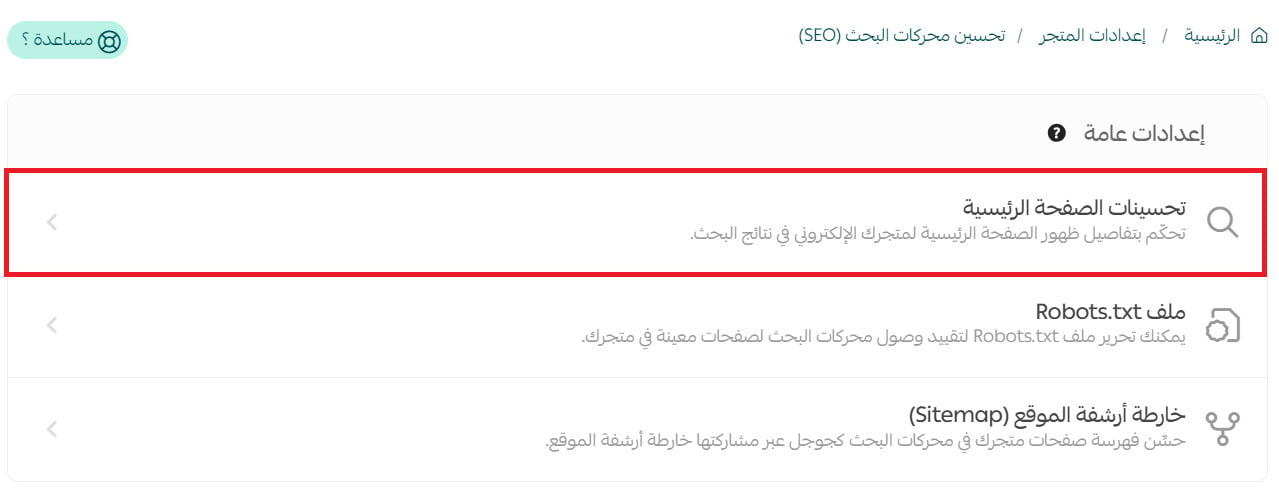
4. Write the homepage title and description, add your most important keywords, choose how store links display, then click Save.
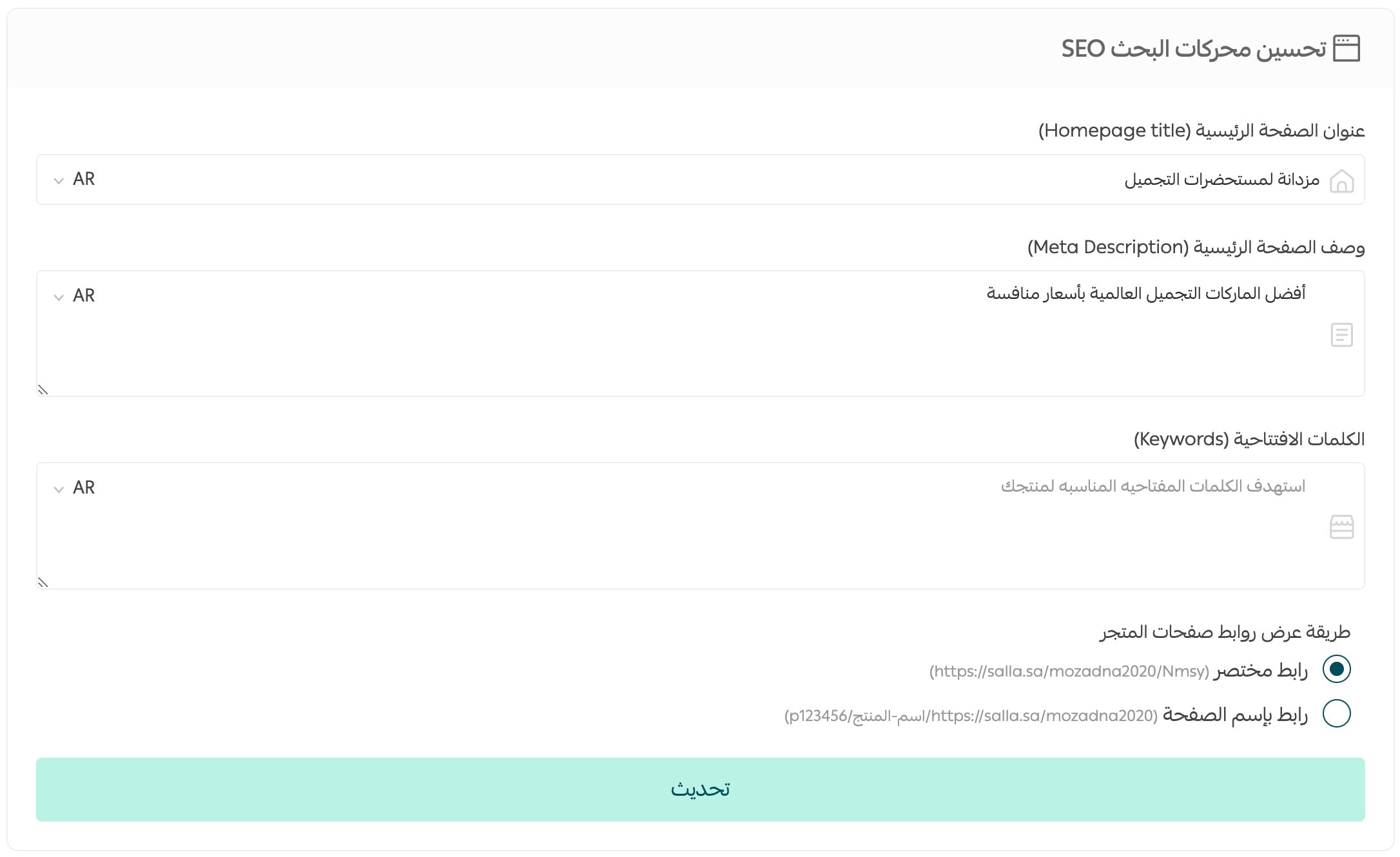
- Title: 50–60 characters, starting with the most important keyword your customer searches, then your store name. Example: "Original Men's Perfume | ... Store".
- Meta description: 140–160 characters — a sentence that sells, not keyword stuffing: what you sell, what sets you apart, and a clear reason to visit.
- Keywords: pick what buyers actually type, not internal terms. "Specialty coffee" beats "caffeine products".
- Never stuff the same keyword — Google understands meaning, and stuffing hurts more than it helps.
2. Telling Google about your store with a sitemap
A sitemap is a file that lists every page in your store, telling search engines: "these are my pages, come and index them." Salla generates this file for you automatically; your job is to submit it to Google Search Console — the free tool that connects your store directly to Google and shows you how it sees you.
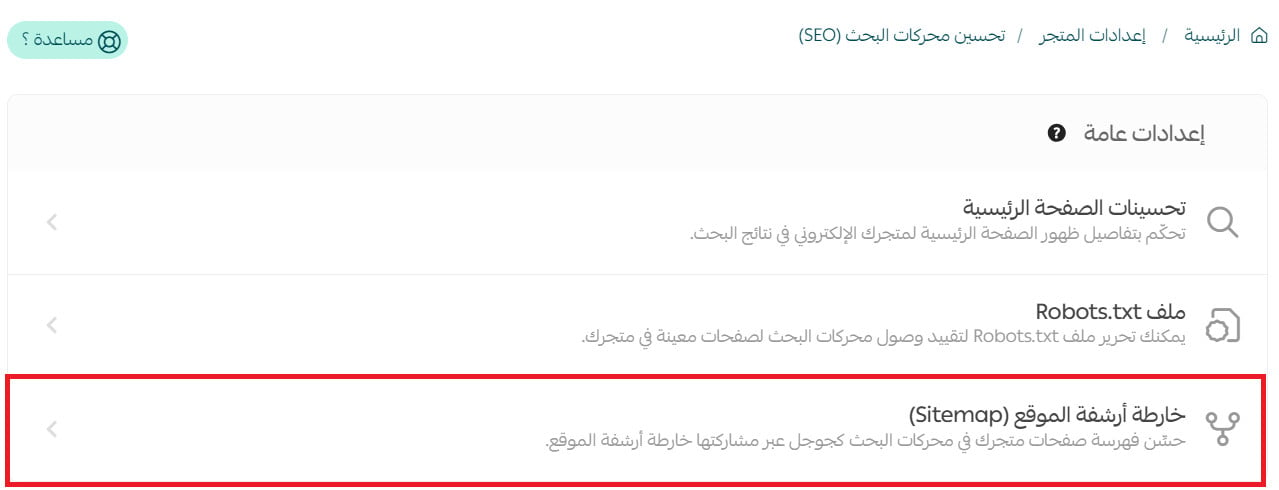
1. Under Marketing Tools → SEO → General settings, choose Sitemap.
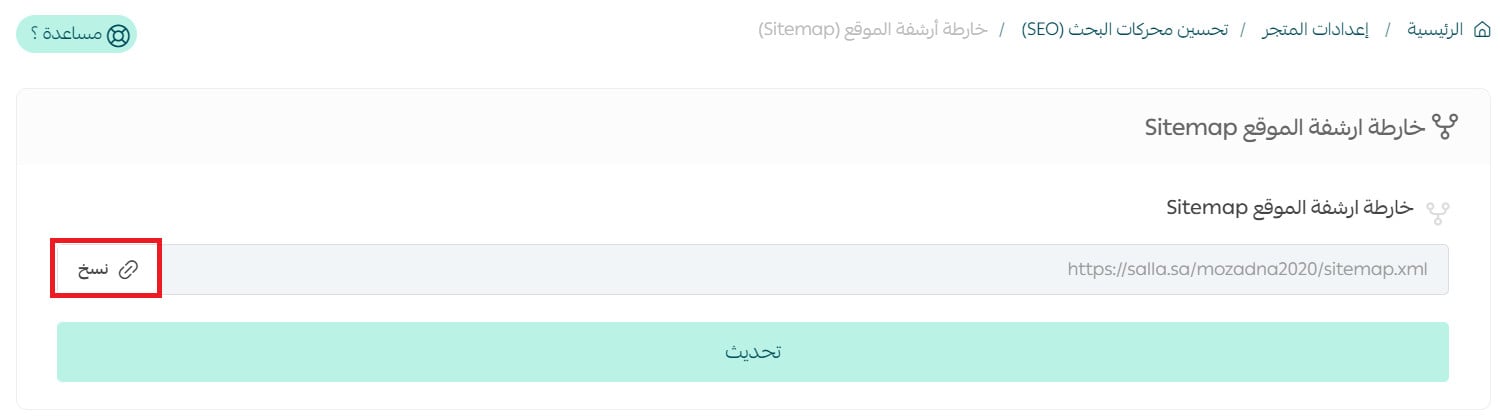
2. Click Copy to copy the sitemap link.
3. In Google Search Console, open Sitemaps from the side menu.
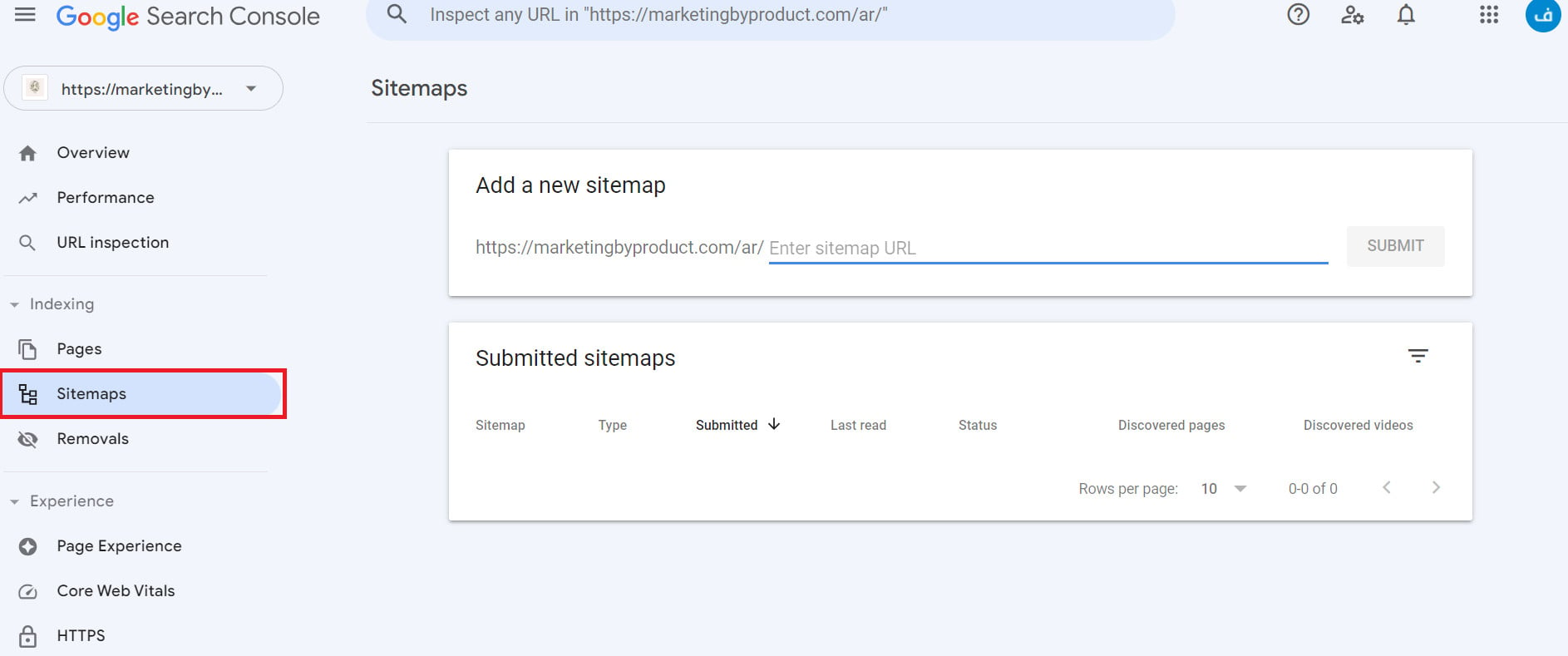
4. Paste the copied link into the box, then click Submit.

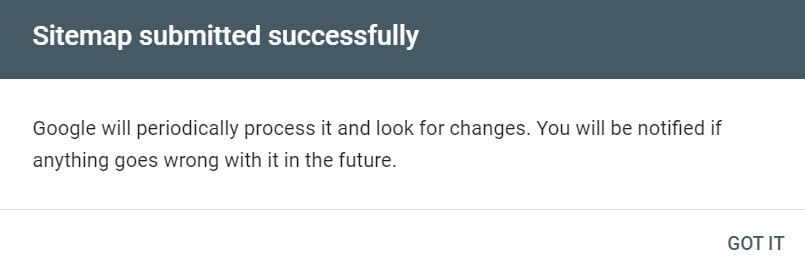
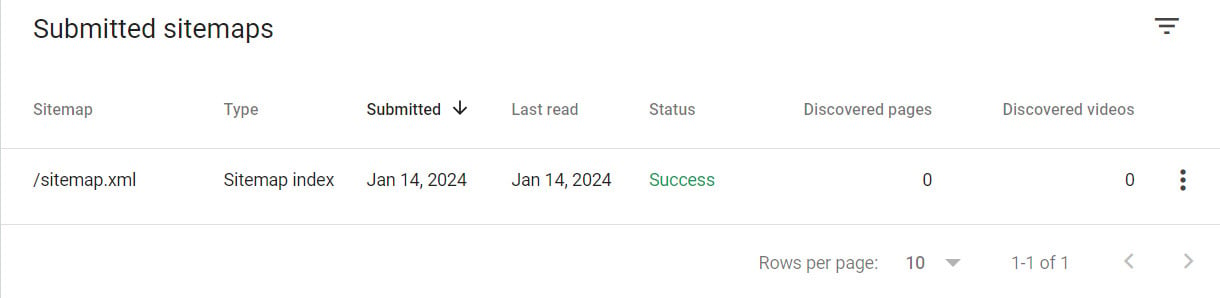
A success message appears, and the link is then listed among your submitted sitemaps.
- It speeds up Google's discovery of your new pages, especially for young stores with no external links yet.
- If you don't have a Search Console account yet, create one for free and verify domain ownership first — without it you can't submit the sitemap or see how your store performs in search.
- Later, check the Indexing report to see how many pages Google actually indexed versus what you submitted.
3. Controlling crawler access with robots.txt
The robots.txt file is a simple text file that tells search engines which pages they may crawl and which to skip. Excluding pages with no search value (like the cart or internal search results) directs Google's crawl budget toward the pages that matter and improves indexing speed.
1. In the SEO settings, choose Robots.txt file.
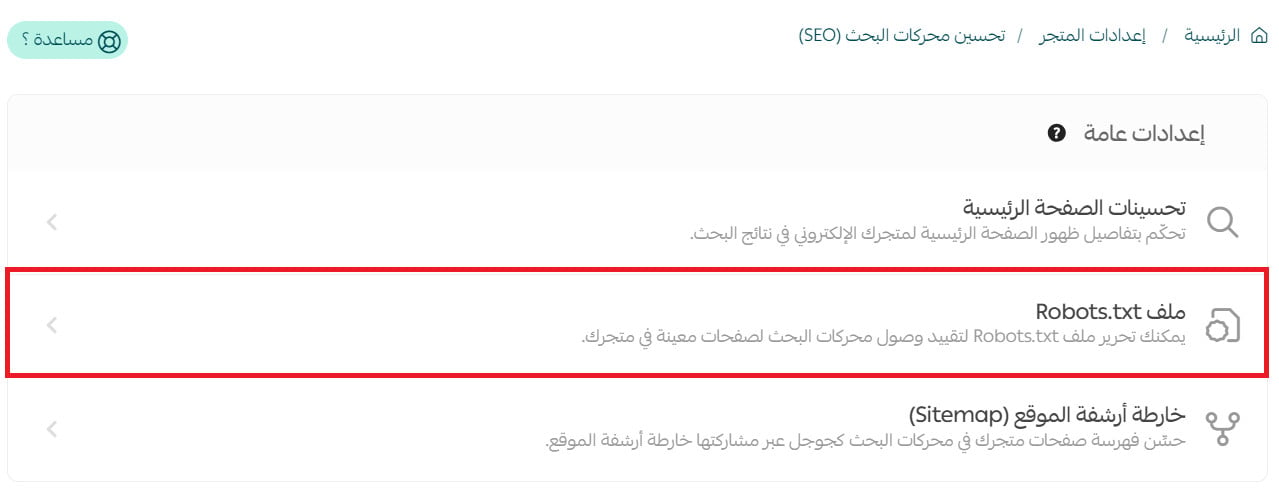
2. You can edit the file to restrict crawler access to specific pages.
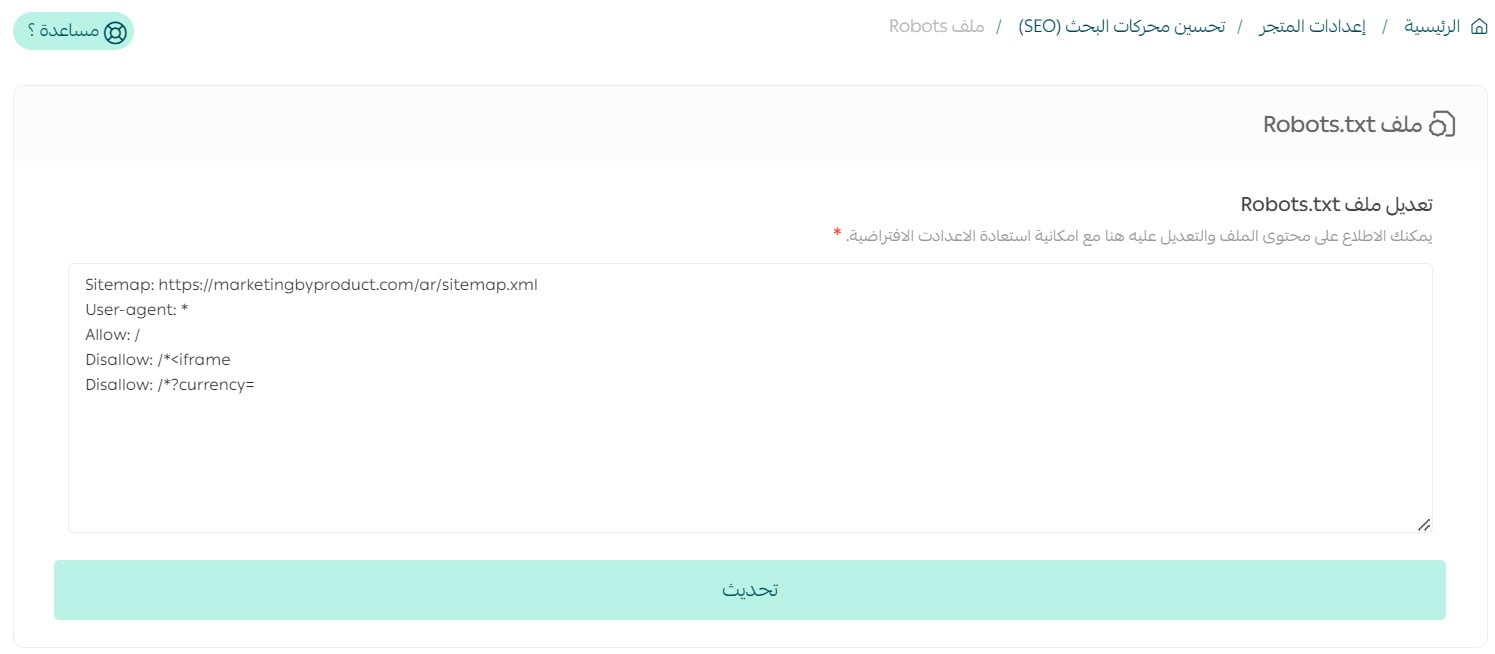
A single mistake in this file can hide your entire store from Google. Never add a Disallow: / rule, and don't block folders whose purpose you don't understand. Salla sets safe defaults for you — only change them for a clear reason. And if you see a "Crawled – currently not indexed" status in Search Console, that is not a Salla issue but a Google decision under its own policies: review content quality and policy compliance, then request review again and wait.
4. Optimizing product pages
The product page is where a searcher becomes a buyer. Each product has independent control over its page title, URL and description in search.
1. On the product page, click Product data.
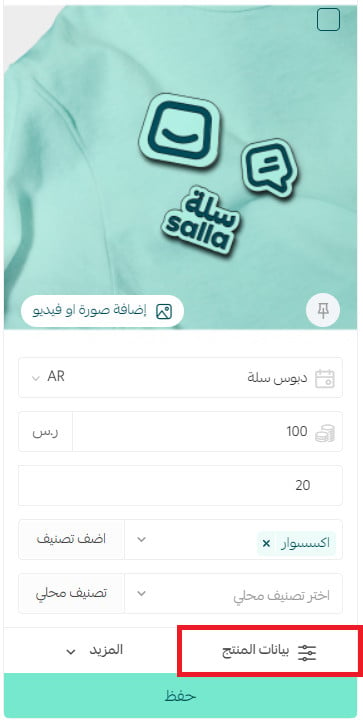
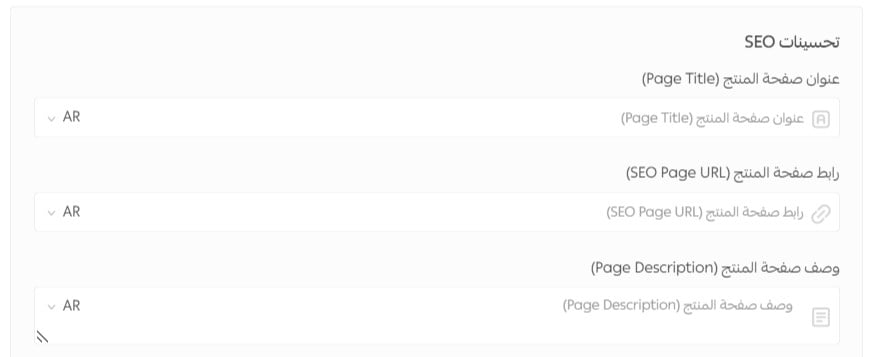
2. In the SEO optimization section, enter the product page title, add a custom URL (leave it blank to use the default), enter a description, then click Save product data.
To preview the product URL, it appears at the bottom of the data page:

The "English page-name URL" feature does not appear in the sitemap if the store runs in a single language only. To show English URLs: enable multi-language, add English, and enter product names in both Arabic and English — the sitemap will then correctly list links in both languages.
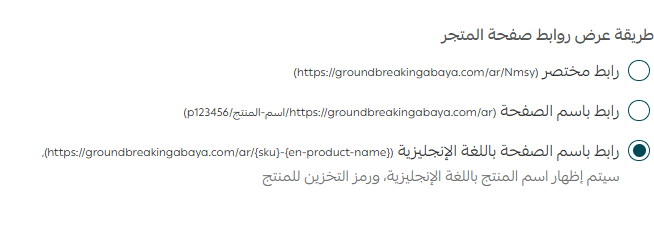
- Title: product name + the top attribute buyers search (size, color, material, "original"). Lead with the most important word.
- Description: answer the buyer's questions before they ask — benefit, how to use, sizing, what sets you apart — in a natural tone, no stuffing.
- Don't copy the supplier's description verbatim: duplicate content weakens the whole store's rankings, not just that page.
- Keep the URL short and clear with the target keywords; avoid random numbers and symbols.
5. Optimizing category pages
Category pages are the strongest sales pages in SEO, because they target broad, high-intent searches like "men's perfume" or "running shoes". Optimizing them often brings more traffic than optimizing a single product.
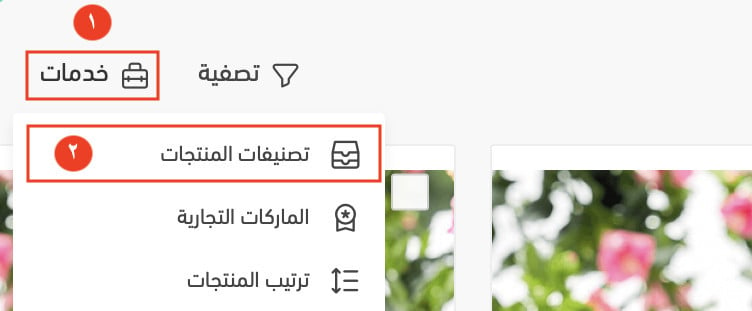
1. On the product page, click Services, then choose Store categories.
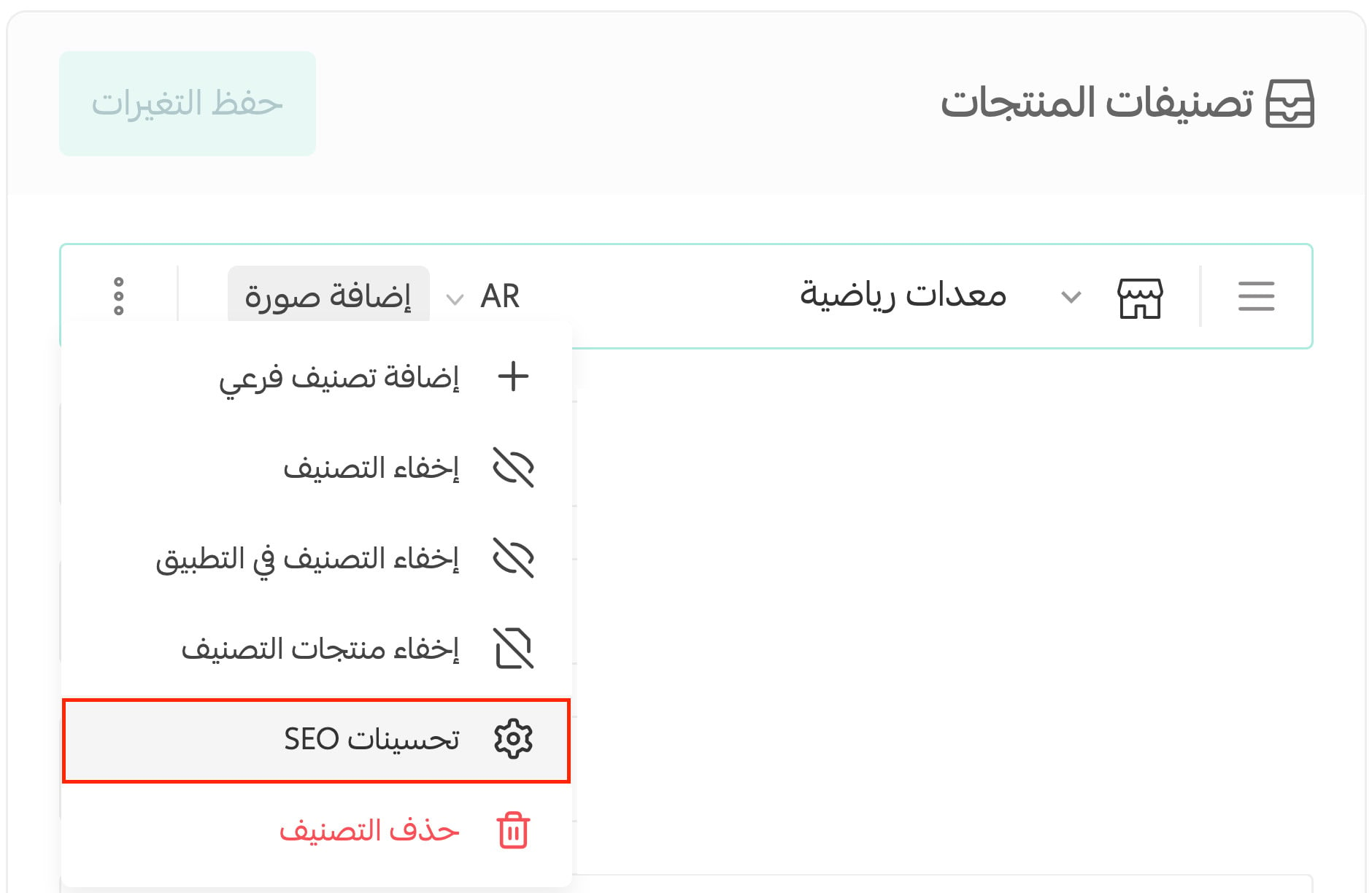
2. On the category row, click the side buttons (...) and choose SEO optimization.
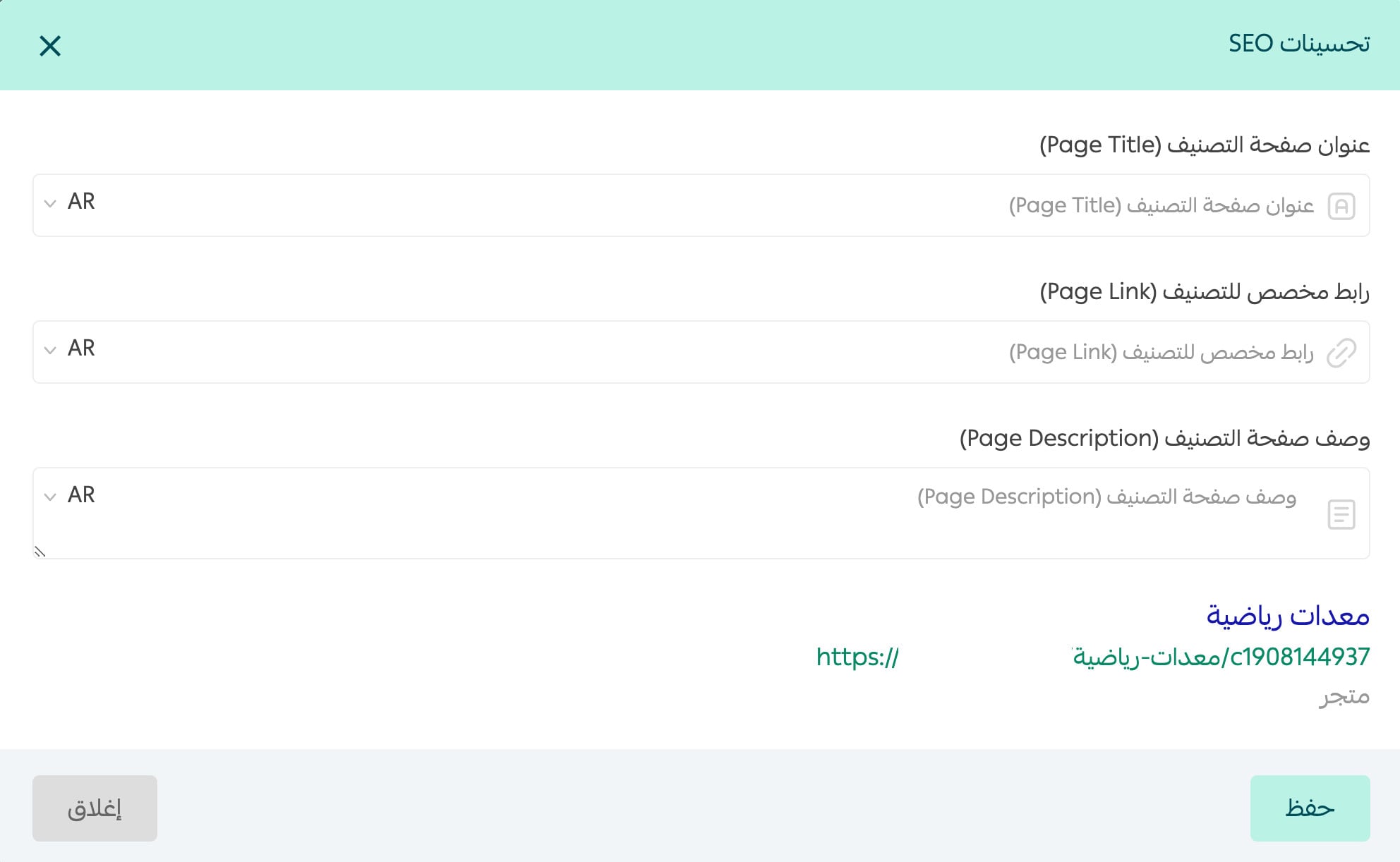
3. Enter the category page title, custom URL and description, then save.
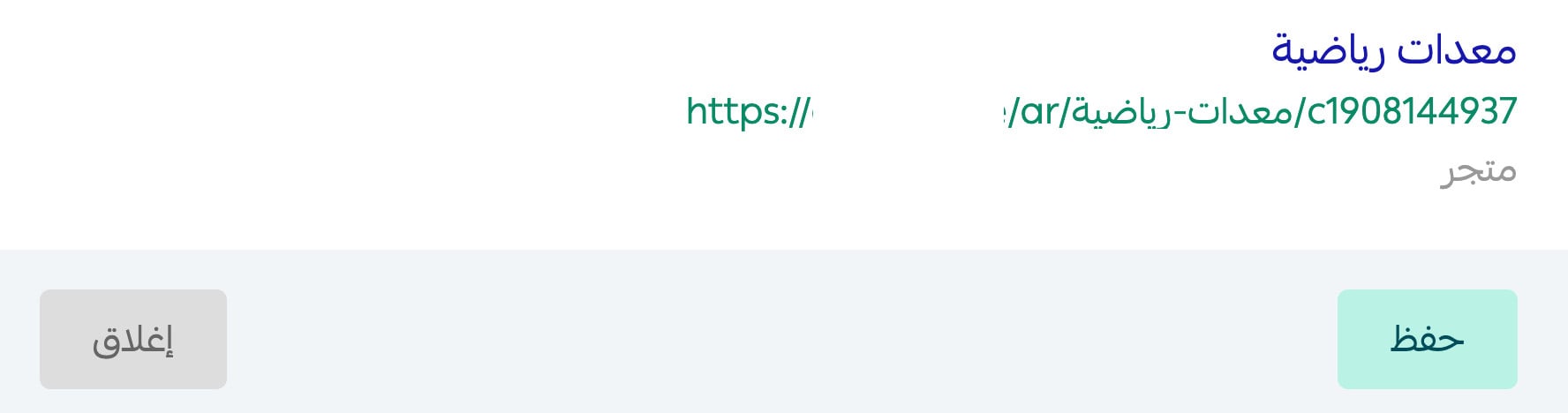
To preview the category URL, it appears at the bottom of the data page.
Add a descriptive paragraph (at least 200–300 words) below the product grid on your main categories, explaining what the customer finds, how to choose, and why buy from you. Google treats a category page with no content as "thin" and won't rank it. And write the title the way people search: "Original men's perfume" beats "New collection".
6. Optimizing brand pages
If your store sells known brands, brand pages are a golden opportunity: many people search the brand name directly. Optimize them the same way you optimize categories.
1. On the product page, click Services, then choose Brands.
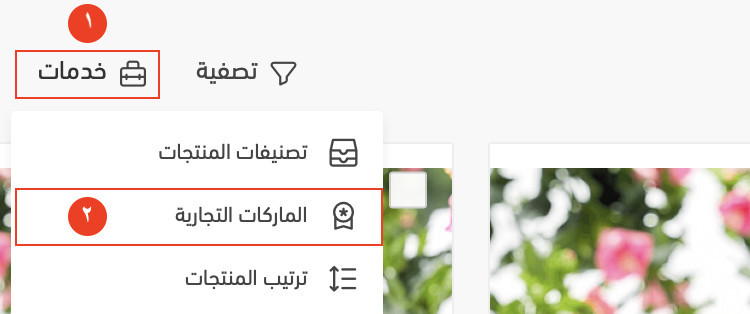
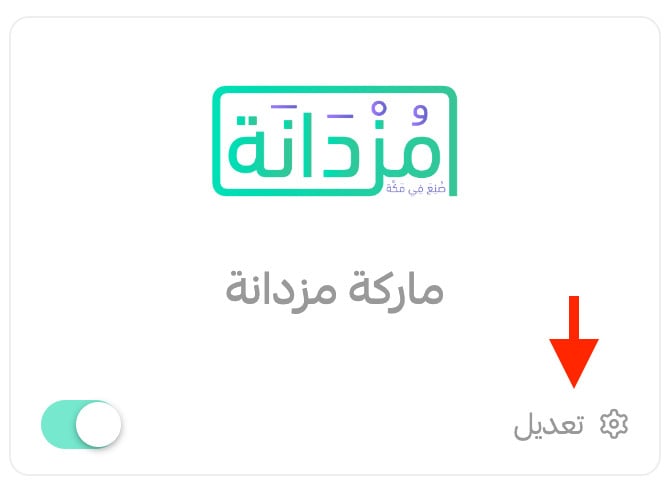
2. Click Edit on the brand you want.
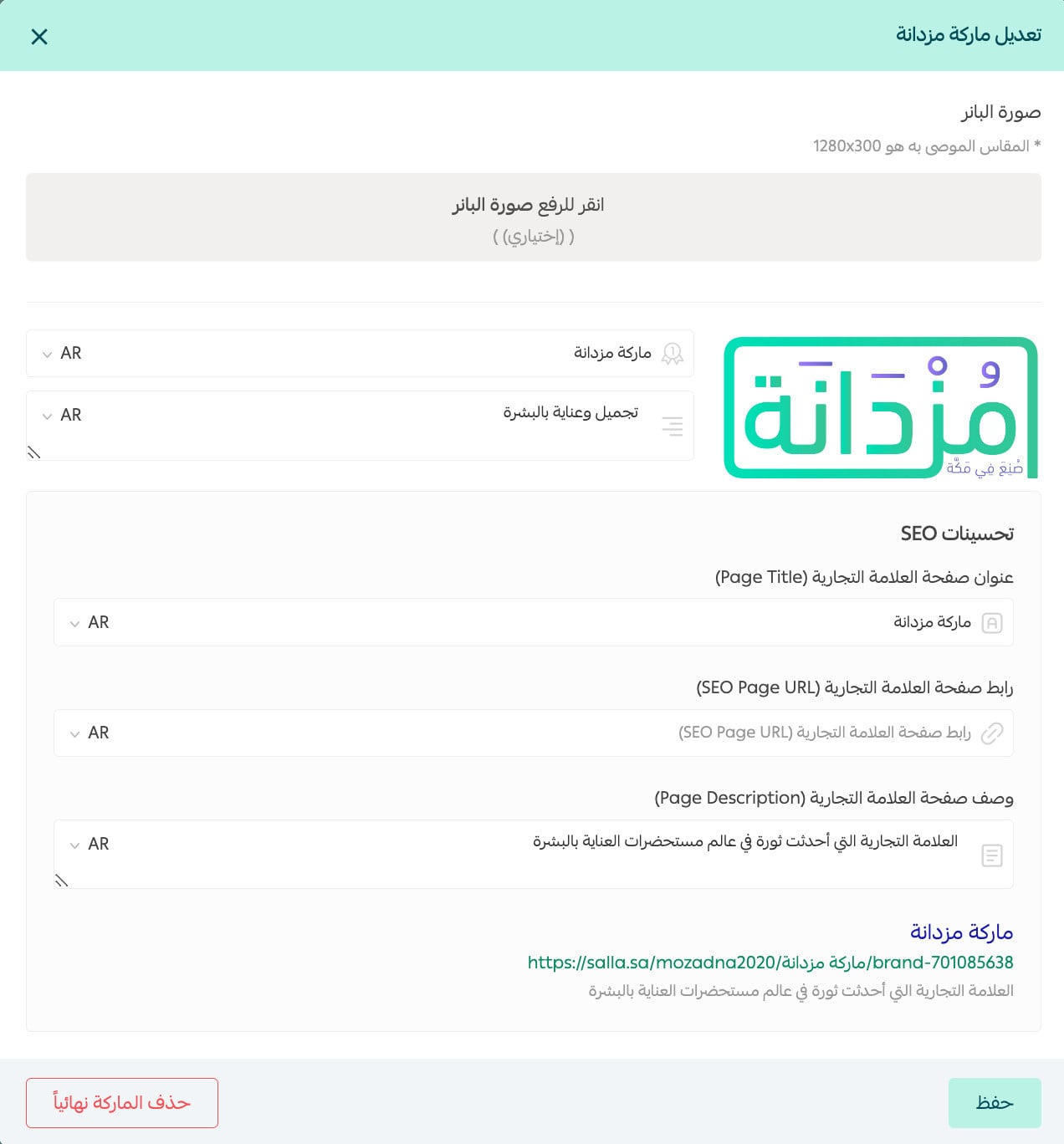
3. Enter the brand page title, custom URL and description, then save. The preview link appears at the bottom of the data page.
7. Image alt text
Search engines don't "see" images — they read the alt text you write for them. Good alt text opens an extra traffic door through image search and improves your store's accessibility for visually impaired users.
1. On the products page, click Add image or video from the product card.
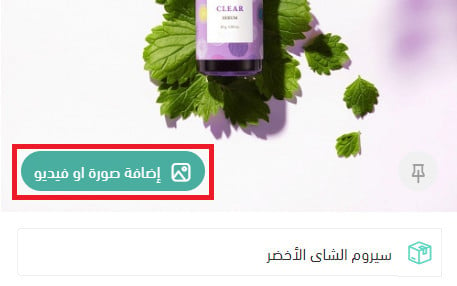
2. Click the Alt button on the image.
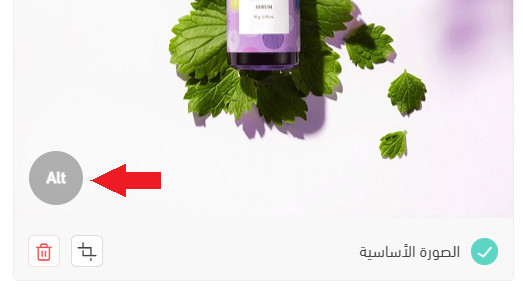
3. Write an accurate description that helps the search engine understand the image, then save.
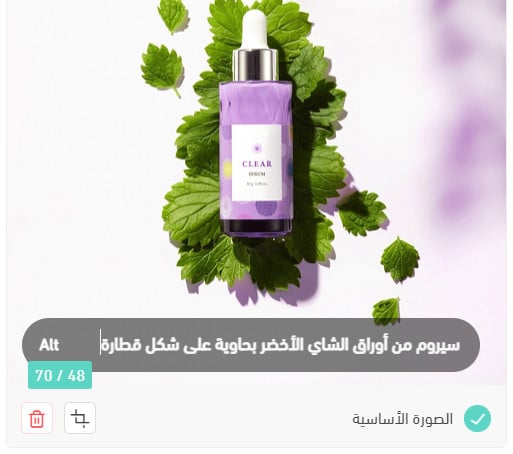
- Describe the image as if to someone who can't see it: "White genuine-leather running shoe, size 42".
- Include the target keyword naturally, without stuffing a keyword list.
- Don't start with "image of…" — the search engine already knows it's an image.
8. Your store blog
Regular blogging tells Google your store is alive and active: each new article is a new page that can rank, and a meeting point with the buyer in the comparison stage before purchase. The blog is also the best place to answer customer questions and build trust.
- Publish content that solves a real problem or answers a question people actually search.
- Write in a clear, well-structured way with subheadings and short paragraphs.
- Use keywords naturally within useful context.
- Link every article to the relevant category and product pages — an article with no internal link to a sales page is a visit that comes and goes with no impact.
Beyond the settings: what actually moves the needle
The Salla settings above are the starting line every store must cross. But ranking for competitive keywords needs something deeper — and that's where the specialist's work begins:
- Real buyer keyword research: a keyword map for every category and product built on what the Saudi buyer actually types, not a translation of foreign lists.
- Speed (Core Web Vitals): a slow store loses both rankings and sales. We measure and improve load speed, on mobile specifically.
- Structured data (Schema): product and review schema surface stars and price in the search result, lifting click-through rate.
- Internal-link architecture: channeling page authority toward the important sales pages instead of scattering it.
- Building a strong reputation online: earned links from trusted Arabic sites through real outreach — not random buying that risks penalties.
- Continuous measurement: weekly monitoring in Search Console and a monthly report you actually understand.
This is exactly our methodology at SEOS7: analyze, optimize, maximize. If you want to see what could change in your store, browse case studies with real Search Console numbers, or explore our Salla store SEO service and plans.
FAQ
How long does SEO take to show results for a Salla store?
Early signals (better indexing and new keywords appearing) usually start within 4 to 8 weeks, while a clear impact on search traffic and sales shows between months three and six. More competitive keywords take longer, but the result compounds and lasts.
Are Salla's SEO settings enough to rank on their own?
They are the necessary foundation, but not enough in competitive niches. Ranking also needs precise keyword research, strong category content, good load speed, and building a strong reputation online. The settings open the door; consistent execution is what gets you to page one.
What's the difference between SEO and paid ads?
Ads give instant traffic that stops when the budget stops, while SEO is a compounding asset: a ranking page keeps bringing customers for free for months. Combining both is usually best, but SEO is what lowers your customer acquisition cost over the long term.
Why does "Crawled – currently not indexed" appear in Search Console?
This status is decided by Google under its own policies, not a Salla error. It often means Google visited the page but didn't find it valuable enough to index. Improve content quality and originality, confirm policy compliance, then request review again.
Do I need a specialist agency, or can I do it myself?
The steps in this guide are ones you can start today, and they'll put you ahead of many competitors. But in a competitive market, or if you're short on time, working with a specialist team saves months and avoids costly mistakes. You can start by requesting a free SEO audit for your store to know exactly where you stand.
Ready to know exactly where your store stands and what's holding it back from ranking? Ask the SEOS7 team for a free audit of your Salla store — you'll get the results and an action plan within 48 hours, no strings attached.