
Most stores pay for advertising before they know whether it will sell anything. Affiliate marketing flips that: you only pay after the sale actually happens. You give an affiliate a share of every order that arrives through their link, which turns influencers, bloggers and newsletter owners into a sales team paid on results rather than promises.
This guide covers enabling the programme in your Salla store, creating an opportunity with its own commission and conditions, inviting and tracking affiliates, then creating your own link from the Partners platform. We also add what the documentation leaves out: how to price a commission so you still profit, and when a programme quietly turns into a loss.
Commission moves the affiliate, a coupon moves the customer, and search traffic moves both. Read the discount coupon guide to design the buying incentive, and the store SEO guide to multiply the traffic your affiliates work with.
- Affiliate marketing and the affiliate link
- Opening affiliate marketing in Salla
- Creating a marketing opportunity
- Managing an opportunity
- Inviting and managing affiliates
- Settings and marketing assets
- Creating an affiliate link as a marketer
- Tracking performance and payouts
- Strategy: a programme that actually sells
- FAQ
Affiliate marketing and the affiliate link
Affiliate marketing is an agreement: a marketer promotes your store or a product, and you pay a percentage or fixed amount on every sale they generate. The cost is variable and tied to revenue, so you never commit a budget before seeing a result.
The affiliate link makes that agreement measurable. Each affiliate gets a unique link, and every visit and order passing through it is attributed to them automatically in your dashboard. Without it, the relationship becomes guesswork about who brought the sale.
Opening affiliate marketing in Salla
1. From the main menu in your dashboard, click Marketing then Affiliate marketing.
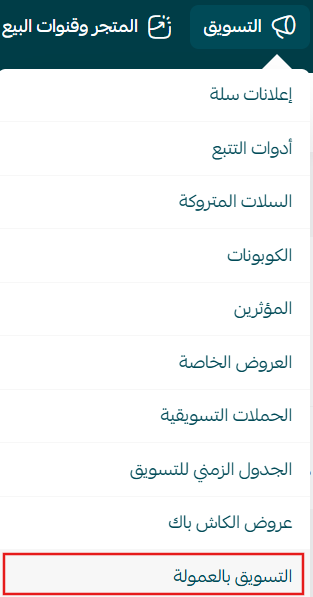
2. Click the Affiliate marketing tab. A page appears listing every opportunity in your store, with options to manage them or add a new one.
Creating a marketing opportunity
1. On the affiliate marketing page, click New marketing opportunity.
2. Fill in three groups of settings, then click Create opportunity.
First: opportunity details
Give the opportunity a clear title describing what the affiliate is promoting, then decide whether the customer gets a discount when arriving through the link — if so, set its percentage and the maximum amount deductible from an order. Finally set the commission rate the affiliate earns once customers buy.
Calculate the discount and the commission together before saving. A 15% customer discount plus a 15% commission means 30% of order value leaves your margin — if your gross margin is 35%, you are selling at close to zero profit.
Second: conditions
- Minimum order value before a commission counts.
- How many orders earn commission: the first only, the first and second, or every order from the same customer while they use the link.
- Whether the affiliate sees total sales generated through their link.
With "first order only", a customer who clicks the link and buys earns the affiliate a commission — but if that same customer returns a week later and buys again through it, no second commission is counted. "Every order" suits repeat-purchase consumables; "first order only" suits durable goods bought once.
Third: publishing settings
Decide the distribution: a private opportunity shared with one specific affiliate, or a published one every registered marketer can see. Then set a start and end date, or leave both open-ended. Once saved, it appears in your list immediately.
Managing an opportunity
Each opportunity gets a detail page controlling its whole lifecycle:
- Activate or deactivate it to pause promotion without deleting anything.
- View statistics, filtered to a specific date range.
- Share the opportunity link using the ready-made message written for affiliates.
- Edit the commission, conditions or duration.
- Delete or export from the actions tab.
- Search and filter by part of the name, and save filter sets as a reusable template.
Once an affiliate has joined, an opportunity cannot be permanently deleted. Instead, disable that affiliate's link, which stops both the link and its discount code. Editing stays available on the opportunity data and applies to the opportunity the affiliate joined.
Inviting and managing affiliates
From the opportunity page click Add affiliate and choose how to invite: by email, adding the address and clicking Send invitation; by sharing the link, using Copy message; or from affiliates already registered in your store.
The affiliate management page gathers everyone connected to your opportunities into one view: how they joined, visits, sales, commissions and join date. From the actions column you can invite an affiliate to a new opportunity without changing pages, and filter by sales, location or source.
Settings and marketing assets
Open the Settings tab on the affiliate marketing page. Two options here decide how many affiliates sign up at all.
Recruiting affiliates from inside your own store
Enable Show the affiliate programme in the store, and a link appears in your storefront footer.


This is smarter than it looks. Existing visitors are your best potential affiliates because they already trust the product, so showing them the programme converts a satisfied customer into a promoter at no acquisition cost.
Uploading marketing assets
In the same screen, click Customise next to the marketing attachments option to upload images, videos and ad creatives. These appear on the product page inside the affiliate marketplace.

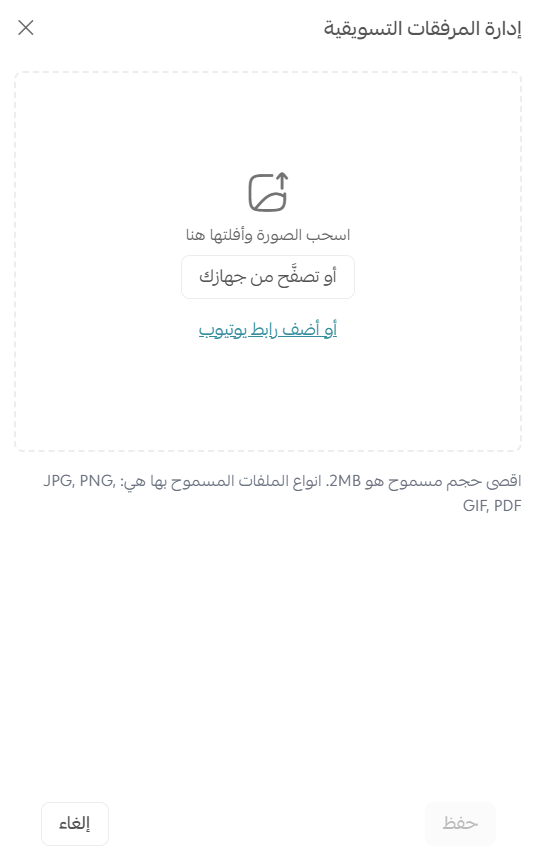
The less effort a promotion takes, the more likely it happens. Prepare platform-sized images, copy-and-paste captions and a short product clip. An affiliate who finds everything ready posts today instead of next month.
Creating an affiliate link as a marketer
The other side of the equation: if you are the affiliate, your commission link is created inside the Partners platform.
1. In the side menu, click Affiliate marketing then Affiliate store.
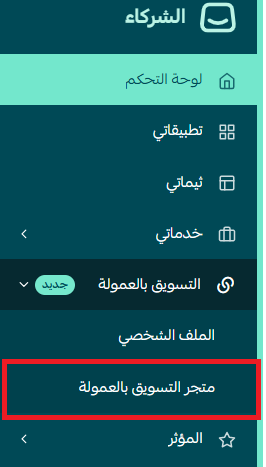
2. Open the Merchant products tab.
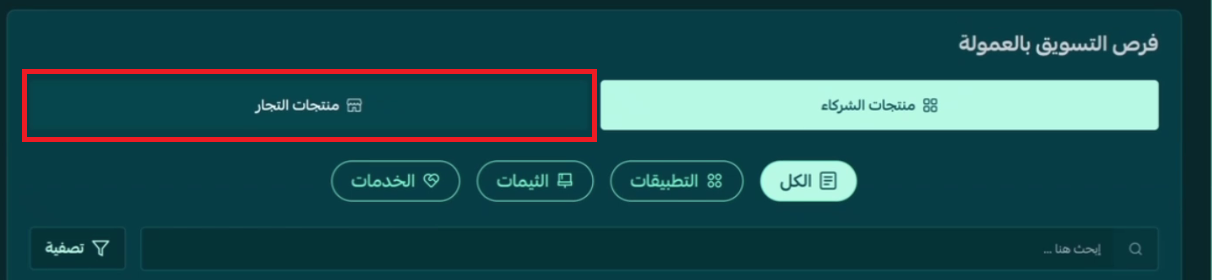
3. Choose what to promote — products or stores — or leave the filter on All. Each card shows whether a link is available for the whole store, for products, or both.
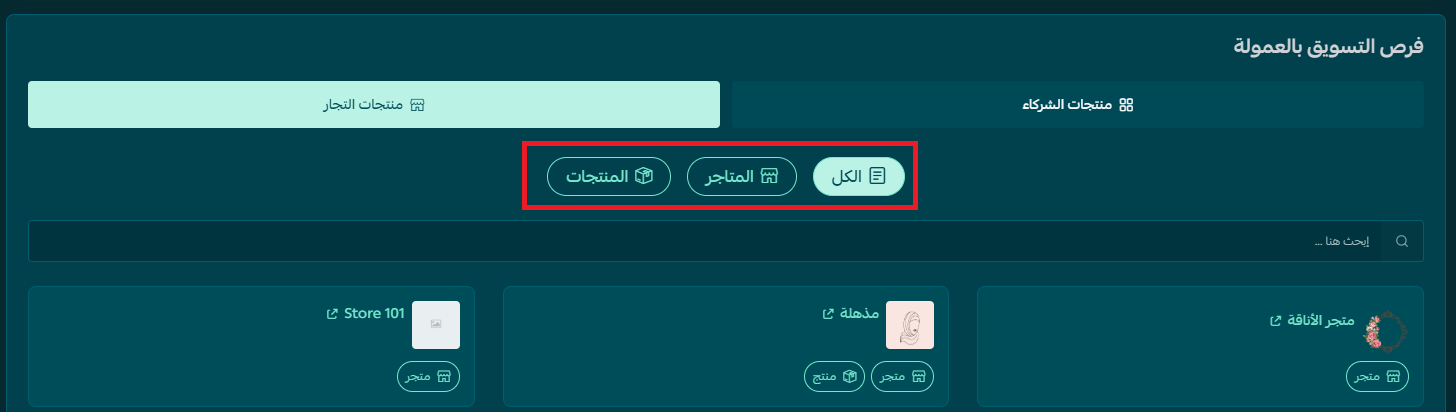
4. Click a store card to create your own link for that store or its products.

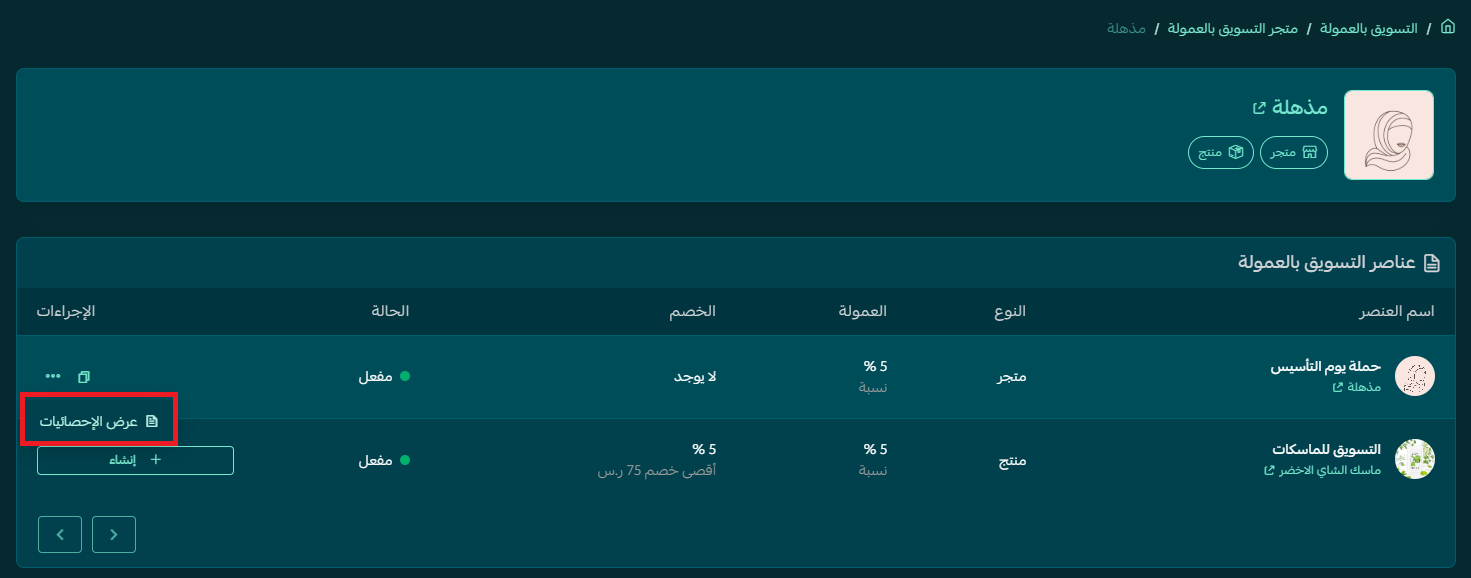
5. The Affiliate marketing items page opens with a table of items, types, commission rates, discounts and status. In the actions column of the item you want, click Create.
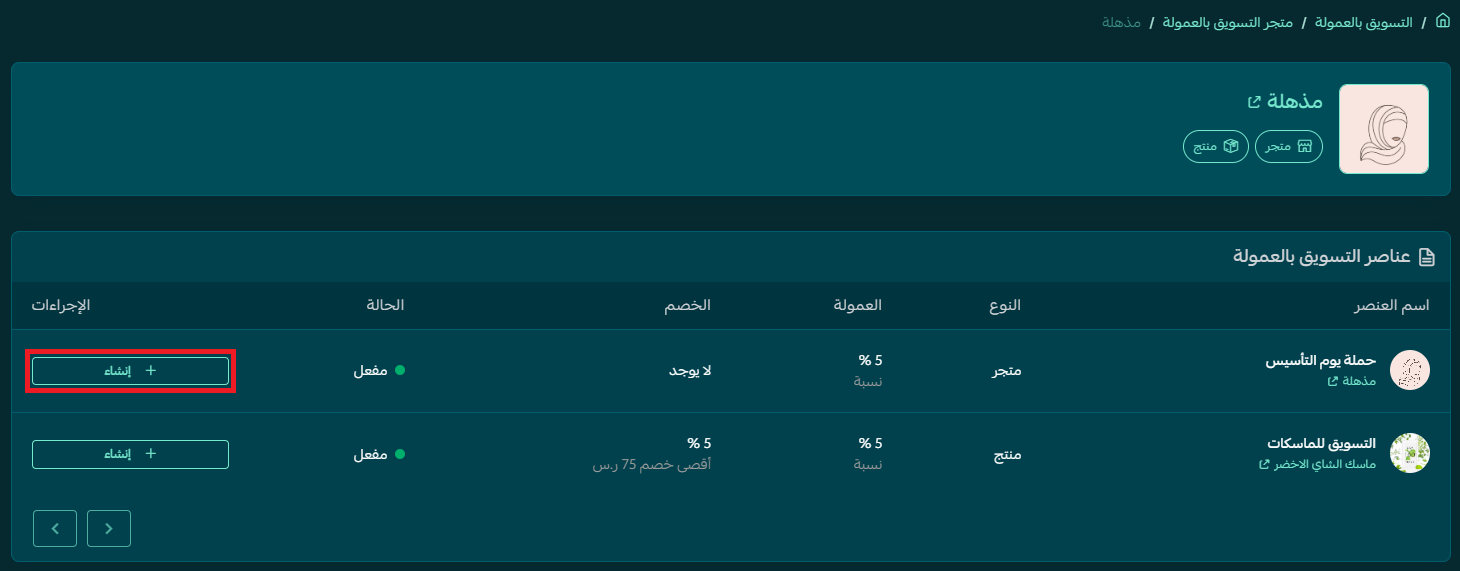
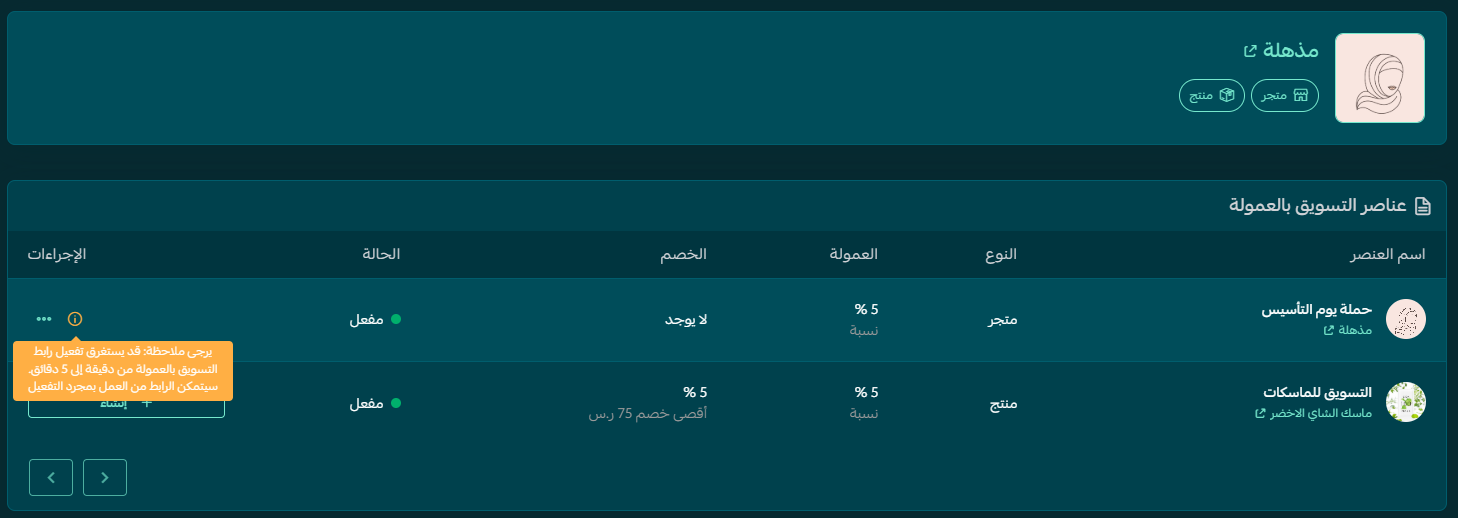
6. Give it a moment — the notice in the table explains activation can take one to five minutes.
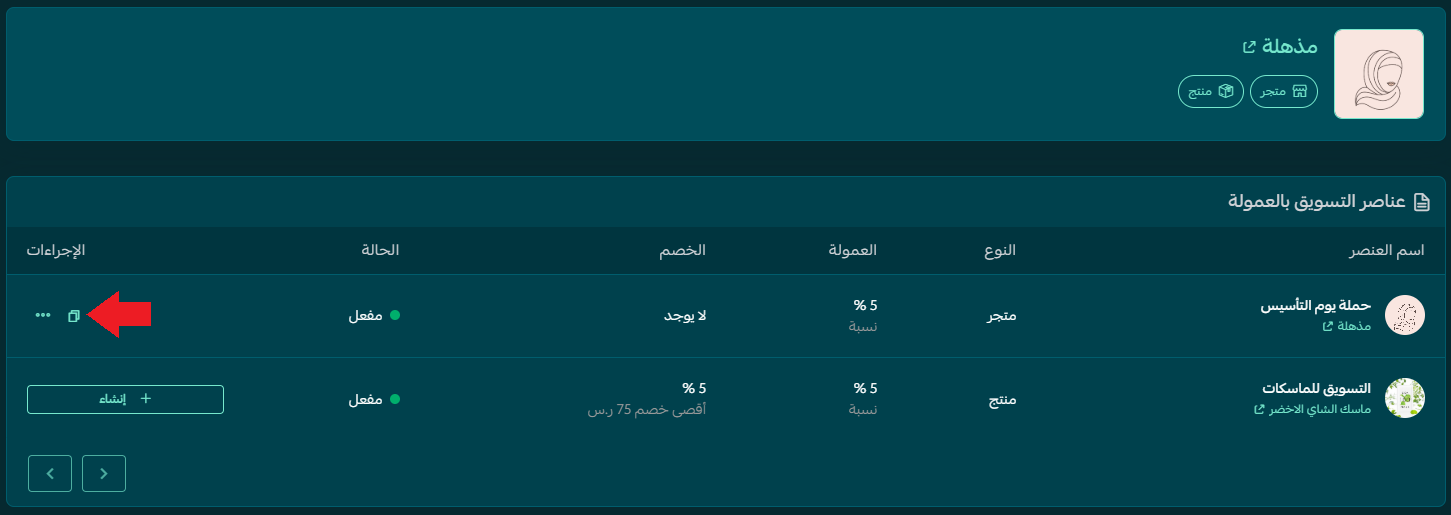
7. Once active, a copy icon replaces the create button. Click it to copy your link and share it with your audience. Repeat for any available item — one link for the store, separate links for products.
Tracking performance and payouts
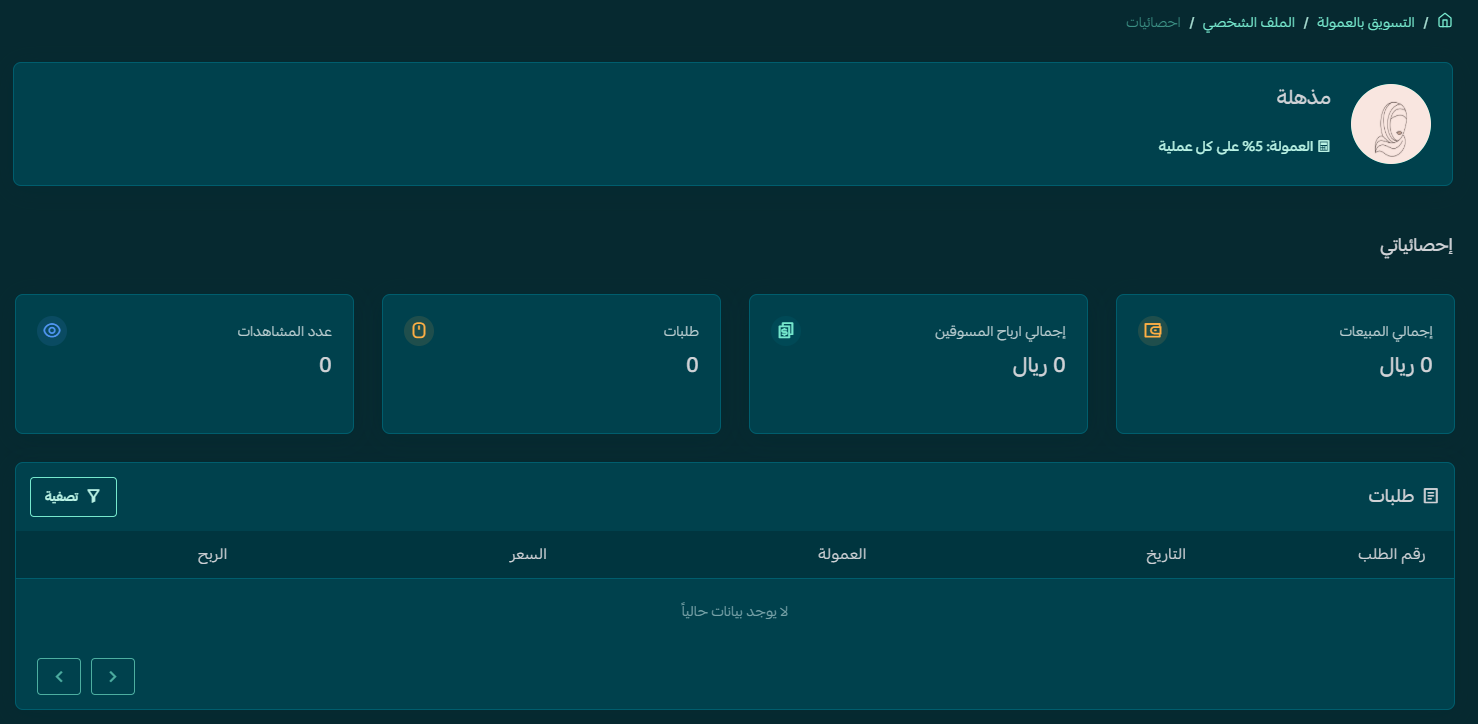
To see how a link performs, open its actions and click View statistics.
The page shows total sales through the link, your affiliate earnings, order count and view count, plus a table of orders with dates, commissions and profit.
Payouts are automatic. Salla invoices the merchant for commissions owed, the merchant settles through the platform, and the commission reaches the affiliate's Partners account on one of two monthly dates: the 14th or the 28th.
Affiliates once promoted with external links without registering, which weakened transparency and limited tracking. Verification is now required, so merchants work with vetted affiliates while affiliates get an analytics dashboard and access to public and private opportunities alike.
Strategy: a programme that actually sells
Switching the feature on is easy. What separates a programme that adds revenue from one that quietly eats your margin is the decisions below.
- Start from gross margin, not a number you saw somewhere: work out the margin per category, then cap the commission at roughly a third of it. High-margin lines carry a bigger rate; low-margin lines are better protected with a high minimum order value.
- Separate new customers from existing ones: the most dangerous leak is paying commission on a customer who would have bought anyway. Watch affiliates whose sales come entirely from repeat buyers, and prefer "first order only" on public opportunities.
- Use the minimum order value as a pricing lever: raising it slightly lifts average order value and pushes affiliates toward bundles instead of your cheapest product.
- Save private opportunities for relationships that matter: give a serious influencer a higher rate privately rather than raising it for everyone.
- Track link expiry: links stay valid four months then stop. A quarterly reminder to refresh active partners' links keeps a campaign from going dark unnoticed.
- Point links at a page that converts: send traffic to a ready-to-buy product page, not the homepage.
The mistakes we see most: setting a rate before knowing the margin, stacking a customer discount on top of a commission without modelling the combined effect, and launching a public opportunity on weak terms then wondering why nobody joined. Affiliates compare offers in an open marketplace, and an unattractive one never gets picked.
And the point most merchants miss: the affiliate delivers a visit, but the product page closes the sale. Slow pages, thin product data or unclear shipping mean you pay commission on traffic that evaporates. At SEOS7 that is where we start — we analyze, optimize, maximize: analyze the journey from first click to checkout, optimize whatever blocks conversion, and maximize the search traffic feeding every channel you run. See our case studies or explore Salla store SEO.
Frequently asked questions
What is the difference between an affiliate link and an affiliate coupon?
An affiliate coupon is a code the affiliate gives to customers: the customer gets a discount at checkout and the affiliate earns commission once the order completes. An affiliate link is a tracking URL shared with their audience; the customer does not necessarily get a discount, but the affiliate still earns a percentage or fixed amount of the cart value.
Do affiliate links expire?
Yes. An affiliate link stays valid for four months, after which it stops working and a new one must be created. Set a recurring reminder to renew active partners' links so an ongoing campaign does not break silently.
Can an opportunity be edited or deleted after an affiliate joins it?
It cannot be permanently deleted once an affiliate has joined, but you can disable that affiliate's link, which stops both the link and its discount code. Editing remains available on the opportunity data itself, such as commission rate, discount, conditions or duration, and applies to the opportunity the affiliate joined.
How and when do affiliates get paid?
Payouts are automatic and need no manual transfers. Salla issues periodic invoices to the merchant covering commissions owed, the merchant settles them through the platform, and the commission is credited to the affiliate's Partners account on one of two monthly dates: the 14th or the 28th.
How do I make sure affiliates choose my opportunity?
Affiliates browse and compare opportunities in the Partners marketplace, so there is no automatic guarantee. Improve your odds with a competitive commission, a clear customer discount and ready-made marketing assets, and send private opportunities by email invitation to the affiliates you specifically want.
Running an affiliate programme but the traffic itself is thin? Commission multiplies what already exists, it does not create it from nothing. SEOS7 combines growing your search traffic with optimising the product pages your affiliates send customers to. Request a free SEO audit for your Salla store and get the results within 48 hours, with no commitment.