
Do your products show up weakly in Google search and Google Shopping despite being good? One of the most common reasons is missing unique product identifiers: GTIN and MPN. These numbers tell Google exactly which product you sell, so it matches it to what the customer searches and shows it to the right people. This guide explains what these identifiers are, why they matter for your Salla store, how to add them step by step, and the quality requirements that keep your products from being rejected.
Product identifiers are a pillar of optimizing product pages. For the full foundation see the Salla store SEO guide, and to understand how Google reads your product data see the Schema Markup guide.
What are GTIN and MPN?
GTIN — Global Trade Item Number: a unique, internationally recognized identifier that pinpoints your product, helps search engines improve your product's visibility in both paid and unpaid results, and makes it easier for customers to find. It's usually the number beneath the barcode on the product packaging.
MPN — Manufacturer Part Number: identifies a specific product among everything the same manufacturer produces. Some shoppers search by MPN directly, so providing it ensures your product is shown to the right users — it's used mainly for products that have no manufacturer-assigned GTIN.
Why they matter for your Salla store
These identifiers aren't shown to the visitor on the product page, but they're written into the page's code for search engines to read. Their impact is significant:
- More precise matching: Google links your product to the exact right product in its database, showing it to whoever searches for it.
- Visibility in Google Shopping and free listings: most Shopping ads and free listings require a valid product identifier; missing it weakens or blocks visibility.
- Better ad performance: products with correct identifiers perform better in Shopping campaigns.
- Cleaner product data: they reduce product rejections in Google Merchant Center.
Adding them in Salla
1. On the product card, under Advanced information, in the Quantities and inventory menu, click Inventory.

2. Enter the product weight and weight unit, the maximum quantity per customer, and the SKU, MPN and GTIN codes.
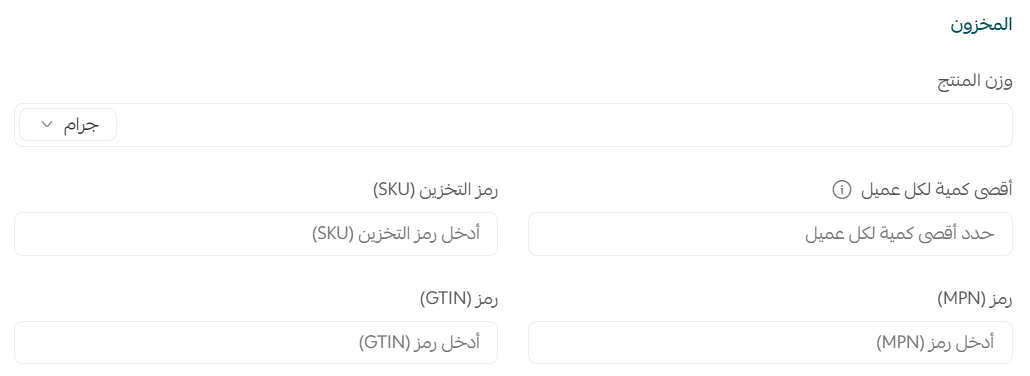
Each product variant (a different color or size) has its own unique GTIN. For example, a "face serum" in large size with a lavender formula has a different number from the large size with a rose formula — enter a correct number for each variant separately.
GTIN number types
"GTIN" is an umbrella covering several number types depending on region and product type:
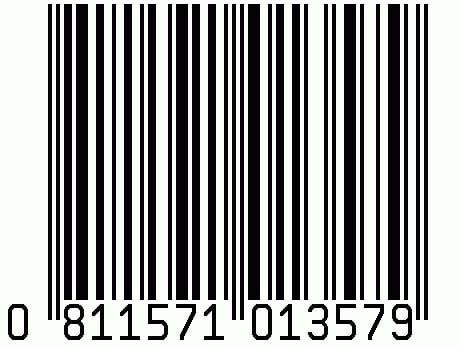
Universal Product Code (UPC / GTIN-12): common in North America, made up of 12 digits (8-digit UPC-E codes are converted to 12 digits).
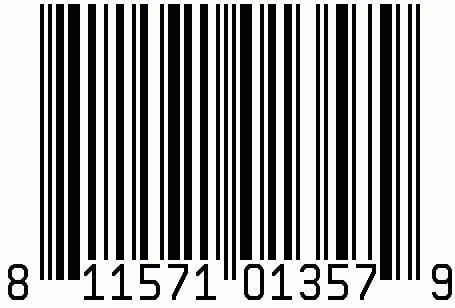
EAN / JAN / ISBN: common in Europe and Japan, and for books worldwide — the 13-digit number beneath the barcode.
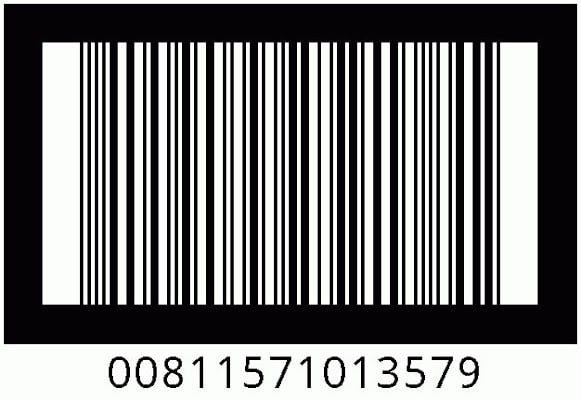
ITF-14: appears on products sold in packs, like shipping cartons — the 14-digit number beneath the barcode.
Download the Barcode Scanner app from Google Play and scan the barcode on the product packaging; it gives you the number and its type directly.
Where do you get GTINs?
If you sell products from known brands, the GTIN already exists on the product packaging beneath the barcode — copy it as is. But if you manufacture your products under your own brand, you get official GTINs by registering with GS1, the global organization responsible for issuing barcodes and product identifiers, which has a local branch in most countries.
Don't invent a GTIN or buy cheap numbers from non-GS1 sources; invalid numbers are rejected in Google Merchant Center and can harm your store account's reputation. And if your product has no manufacturer GTIN (like handmade or made-to-order items), use an MPN with the brand instead.
Quality requirements and rejection reasons
To ensure your products are accepted and shown at high quality, make sure of the following:
- A valid GTIN: confirm it's correct using a GTIN check tool.
- Avoid restricted ranges: don't use numbers with the prefixes 02, 04 or 2 (restricted ranges).
- Avoid coupon ranges: the following GS1 coupon prefixes: 05 and 98–99.
- A unique number per variant: a valid GTIN for each product and each of its variants.
- A real brand: when entering an MPN you may be asked for the brand — avoid values like "N/A", "generic" or "no brand".
When a product is rejected, the reason appears on the Diagnostics page in your Google Merchant Center account — review it, fix the cause, then resubmit.
The specialist's role in product data
Product identifiers are a small detail with a big impact, and managing them across a large catalog is precise work. This is what we handle at SEOS7:
- Catalog audit: we find products missing identifiers and complete them, prioritizing the best-sellers.
- Feed quality: we tune product data (title, description, identifiers, brand) so it passes Merchant Center without rejection.
- Fixing rejections: we analyze the Diagnostics data and fix recurring rejection causes.
- Linking to structured data: so your products appear at their best in search results and free listings.
This is our methodology: analyze, optimize, maximize. Explore Salla store SEO, or browse the case studies.
FAQ
Are GTIN and MPN mandatory?
No, they're optional. But adding at least one of the two boosts your products' visibility in search, shows them to the right customers, and improves ad performance — so we strongly recommend it.
Do GTIN and MPN show to the visitor on the product page?
No, they appear in the page code and aren't visible like other fields, because they target search engines, not the visitor.
Do I enter both numbers, or is one enough?
You can enter both, but if you enter a GTIN you don't need an MPN. MPN is used mainly for products with no manufacturer-assigned GTIN.
Do I add a number for each product variant?
Yes — each product and each variant (a different color or size) has its own unique GTIN, so enter a correct number for each variant separately.
Can both fields be added to all product types?
The two fields are added to product data for all types except bookings, made-to-order products, and food products.
How do I know why my products were rejected?
When a product is rejected, the reason appears on the Diagnostics page in your Google Merchant Center account. Review the cause, fix it (invalid number, restricted range, missing brand…), then resubmit.
Have a large catalog and want every product to carry correct identifiers that show in Google and Google Shopping without rejection? The SEOS7 team audits your Salla product data and prepares it to rank. Request a free SEO audit for your store — results within 48 hours, no strings attached.