
Paid advertising is the fastest way to put your product in front of someone ready to buy today — and the fastest way to burn a budget if you launch without measurement. Salla Ads solves half of that: it brings your campaigns on Google, TikTok, Snapchat and other platforms into one panel inside your store dashboard, adds tracking tools that push real purchase data back to those platforms, and gives you an audience manager that segments your own customers instead of guessing.
This guide walks through every tab: the dashboard, campaign management, the Pixel and Conversion API, the audience manager, and creating your first campaign. Then it adds what the official documentation leaves out — how to set your budget, when to stop a losing campaign, and why a failing ad is usually a product-page problem.
Ad results stop the moment spending stops, while search engine traffic keeps arriving with no cost per click. And the highest-return move with paid traffic is recovering it instead of losing it — see the abandoned carts guide and the discount coupon guide.
What Salla Ads is and why to use it
Salla Ads creates campaigns across several platforms, tracks their performance, connects tracking tools and builds audiences — without hopping between a separate ad manager for every network.
- One place for every campaign: impressions, clicks and spend across all platforms on one screen.
- Store data already connected: products and orders are linked natively, with no fragile code setup to maintain.
- A single ad balance: top up once, let campaigns spend from it, and watch what remains.
- Audiences built from real buyers: segment actual purchasers instead of targeting broad interests.
- A gentler start: a simplified interface that hides much of the complexity of the major ad platforms.
Opening Salla Ads
1. From the main menu in your store dashboard click Marketing.
2. Then click Salla Ads.

The page opens with four tabs: Dashboard, Ads management, Tracking tools and Audience manager. We take them in order.
The dashboard and reading performance
The Dashboard tab is your quick summary: your most recent campaigns, the store balance available to spend, the total number of campaigns, and total ad spend over the last 30 days.
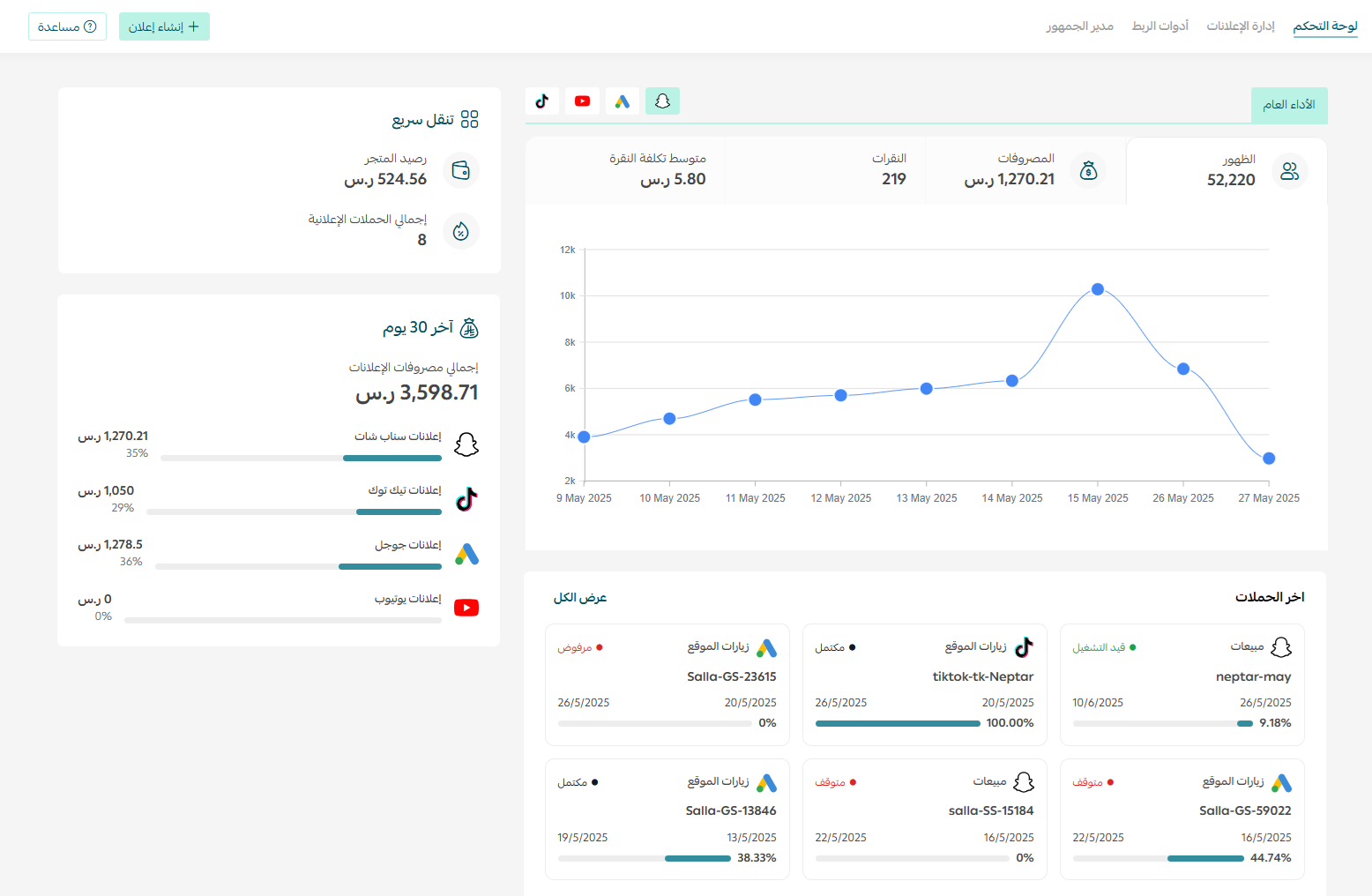
Below it, the Overall performance section reports four metrics per platform you advertise on:
- Impressions: how often your ad was displayed. A reach metric, not a success metric.
- Spend: what you actually spent in the selected period.
- Clicks: how many people clicked through to your store.
- Average cost per click: spend divided by clicks — the quickest read on targeting and creative quality.
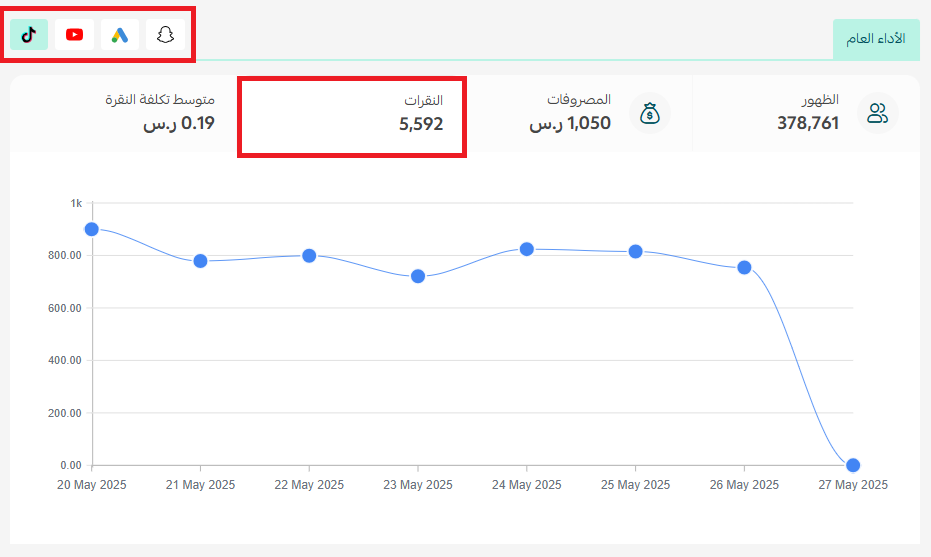
Click-through rate judges the ad itself: many impressions with few clicks means the creative, copy or offer is weak. Strong clicks with weak sales means the problem moved to your store — price, shipping, page speed or missing trust signals. Never fix that by raising the budget.
Managing your ads
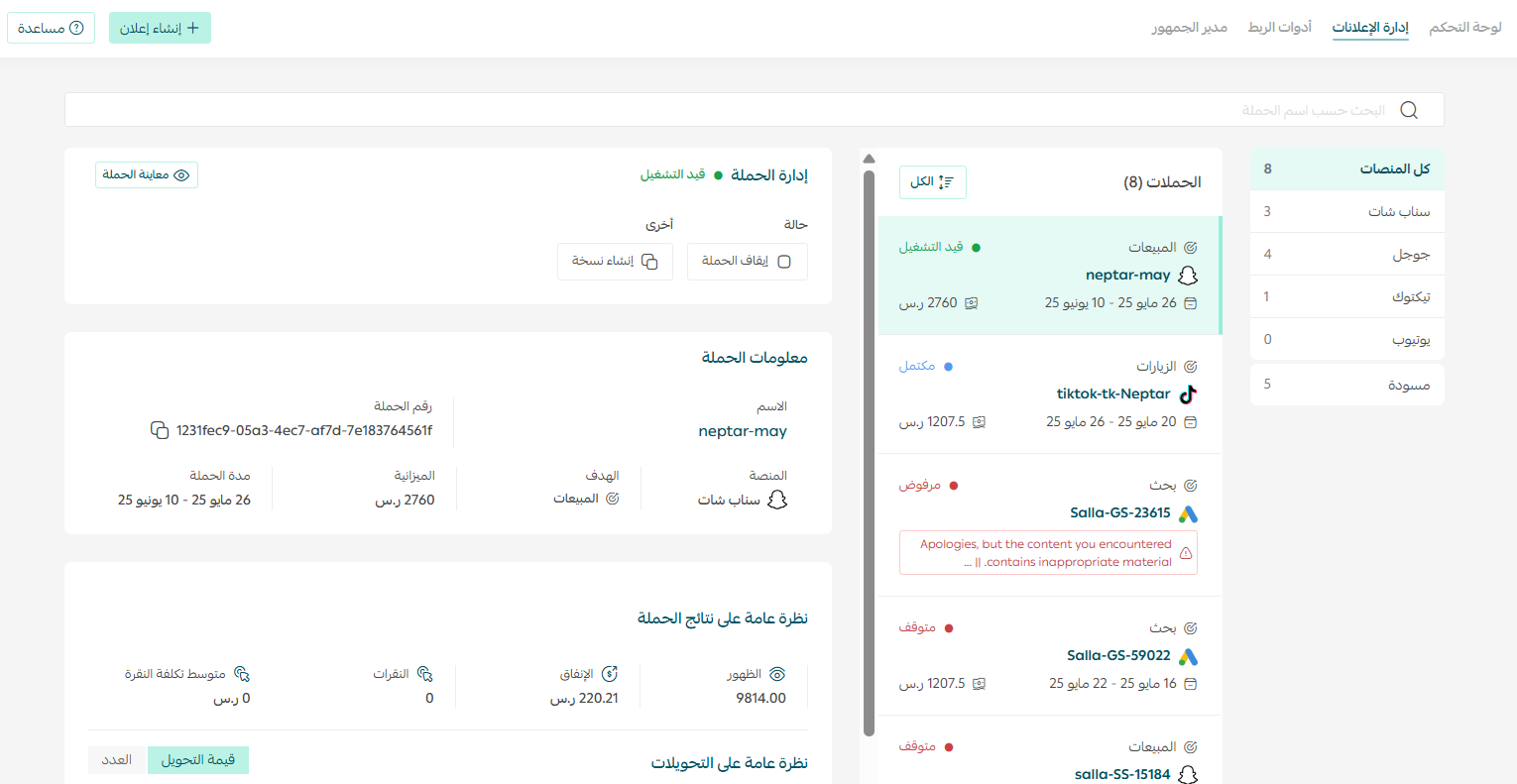
The Ads management tab lists your campaigns, and from it you can:
- View campaign information: platform, status, period and performance metrics.
- Preview the ad: see it as users see it before you spend more on it.
- Pause the campaign: an immediate stop that prevents further spend.
- Duplicate the campaign: copy a winner instead of rebuilding it — the correct way to test one variable at a time.
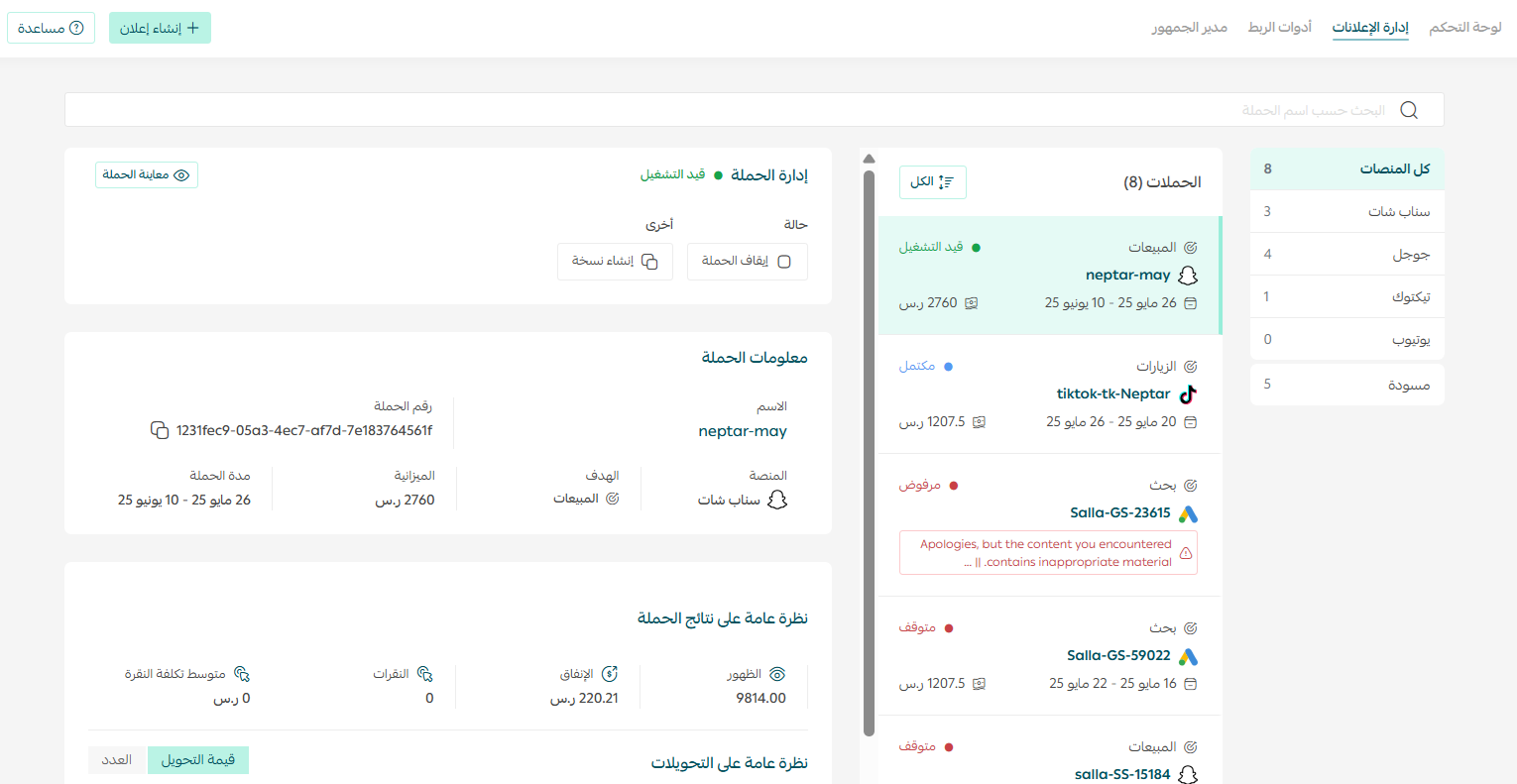
Any material change to budget or targeting pushes a campaign back into its learning phase and muddies your results. To try a new idea, duplicate the campaign and edit the copy, leaving the original running as your benchmark.
Tracking tools: Pixel and Conversion API
This tab is the most valuable part of the tool, and the part new merchants skip most often. Tracking tools give you accurate data about your audience and about what actually happens after the click, through the Pixel and the Conversion API.
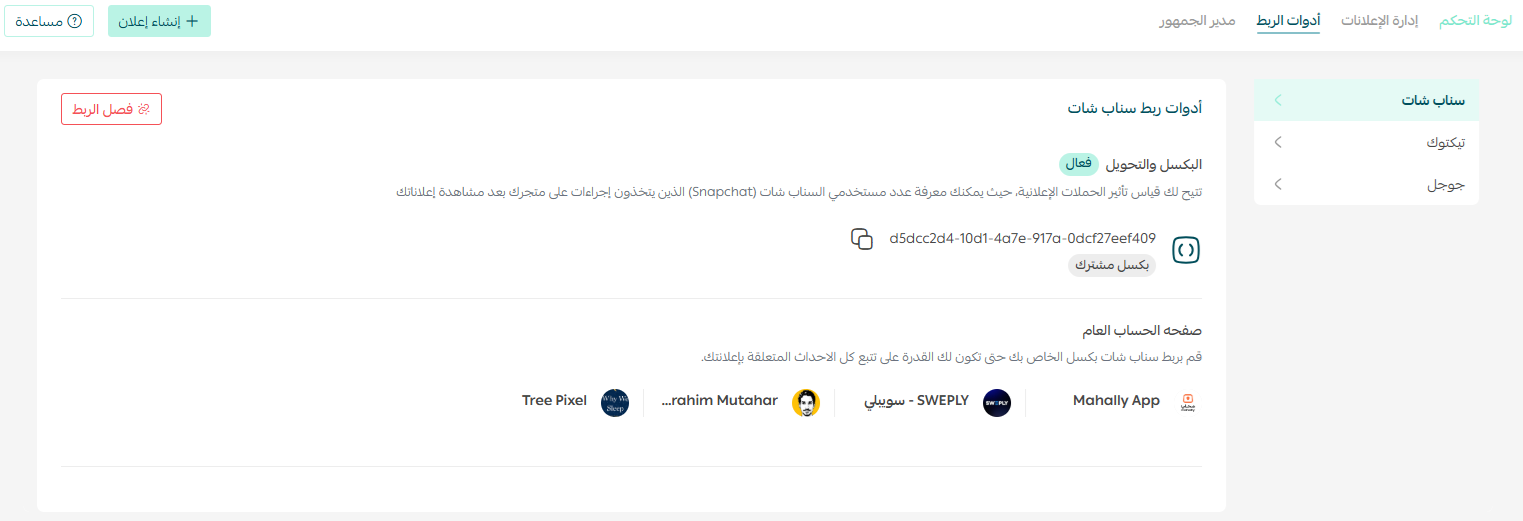
The difference matters. The Pixel is a script running in the visitor's browser that reports what they did — viewed a product, added to cart, purchased — and it is defeated by ad blockers and by browser and device privacy restrictions. The Conversion API sends the same events from the server straight to the platform, so data still arrives when the pixel is blocked.
- Accurate measurement: you know which campaign produced an order rather than guessing at attribution.
- Better automated optimization: algorithms need real purchase signals to find more buyers who resemble them.
- The foundation of retargeting: without stored event data you cannot build an audience of visitors who did not buy.
Launching before tracking is live means spending budget on data you throw away: the platform learns nothing, and you cannot later re-reach the audience you paid to attract. Set up tracking first, then launch.
The audience manager
An audience manager exists in every major ad platform — Meta Audience Manager for Facebook and Instagram, Google Ads Audience Manager, TikTok Ads Audience Manager — to create and manage the audiences your campaigns target.
From the Audience manager tab inside Salla Ads you can add a new audience profile using an email address to populate its data, or view profiles you created earlier.

In practice three audience types matter to every retail store, each with a different job:
- Customer audiences: people who already bought. Use them for repeat purchases, or exclude them from acquisition campaigns so you stop paying to reach someone who ordered yesterday.
- Retargeting audiences: people who viewed a product or added to cart without buying. This segment converts far more cheaply than cold traffic and deserves a fixed budget share.
- Lookalike audiences: the platform finds users who resemble your best customers. Quality depends entirely on the seed list — build lookalikes from buyers, never from all visitors.
Audiences need volume to work. Turn tracking on from day one even if you are not ready to advertise; when you launch, your lists will already be populated instead of needing weeks to fill.
Creating a new ad
1. From the Salla Ads page click + Create ad.

2. Choose the platform you want to run your campaign on, based on your objective and your audience.
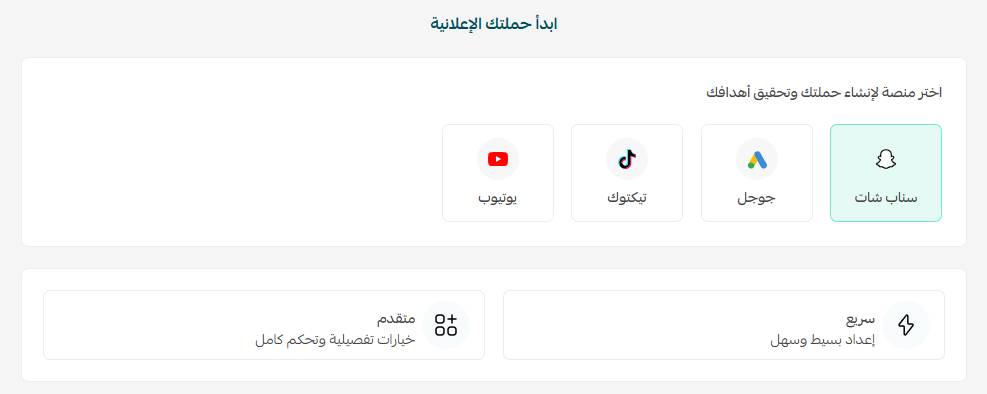
3. Complete the steps for that platform — objective, audience, budget and creative — then launch.
4. The campaign appears on the Ads management page, where you track and control it.
Choosing the right platform for your store
Most beginner losses start with a platform that does not suit the product. The short rule: search platforms capture demand that already exists, content platforms create demand that does not.
- Google Search and its network: best for products people already look for by name or need. Intent is high and conversion faster, though costs climb in crowded categories.
- TikTok and Snapchat: visual products, short-clip demonstrations, and things people did not know they wanted.
- Meta, Facebook and Instagram: strongest at retargeting and lookalikes; a solid fit for fashion, gifting and home goods.
- YouTube: products needing an explanation or visual proof before someone is convinced.
Splitting a small budget across four platforms gives you four unreadable results. Start with the one platform that fits your product, give it enough budget and time to be judged fairly, then expand once you know your benchmark numbers.
A strategy that makes ads profitable
The tool creates the campaign; it does not make it profitable. These are the rules we apply with the stores we grow:
- Know your break-even before you spend: work out your margin after product cost, shipping and fees, then derive the most you can pay to acquire one order. Without that number you cannot tell a winner from a loser.
- Give the campaign a fair window: judging after one day is emotional, not analytical. Platforms need a learning period and enough conversions before performance settles.
- Change one variable per test: image, copy or audience — not all three, or you never learn which moved the result.
- Send traffic to the product page, not the homepage: every extra step between click and add-to-cart loses visitors you paid for.
- Reserve a fixed share for retargeting: bringing back a visitor who knows your store is far cheaper than convincing a stranger.
- Fix the store before raising the budget: slow pages, surprise shipping costs and missing reviews kill excellent campaigns. Check your abandoned carts to see where buyers drop off.
The biggest strategic decision is not letting ads become your only traffic source. A store running on budget alone stops growing the moment the card stops, while one building search engine traffic in parallel lowers its acquisition cost month after month. Ads give you today's result; search visibility gives you next year's.
At SEOS7 we analyze, optimize and maximize: we bring in search engine traffic and convert it into real sales, so your ad budget becomes an accelerator rather than a lifeline. Learn about Salla store SEO, or review our case studies.
Frequently asked questions
What is Salla Ads?
A tool inside your store dashboard that lets you create, manage and analyze advertising campaigns from one place, with tracking tools for measurement and an audience manager for targeting segments.
Which platforms can I advertise on through Salla?
You can create campaigns on platforms such as Google, TikTok, Snapchat and YouTube, and you pick the platform while creating the ad based on your product and audience.
Can I track how my campaigns are performing?
Yes. The overall performance section shows impressions, spend, clicks and average cost per click for each platform, alongside your store balance and total spend over the last 30 days.
Can I target a specific audience?
Yes. Using the tracking tools and the audience manager you can build custom audiences from your customers, retargeting audiences of visitors who did not buy, and lookalikes modelled on your best buyers.
Do paid ads remove the need for search engine optimization?
No. Ads stop delivering the moment spending stops, while search visibility keeps producing orders, so the strongest approach runs both together and steadily lowers acquisition cost.
Spending on ads without the return you deserve? The problem is usually not the campaign but what happens after the click. Request a free SEO audit for your Salla store and within 48 hours we will send a report showing where you lose traffic and orders and how to fix it — no obligation.