
A text message lands on your customer's screen in seconds and usually gets read within minutes. No algorithm decides who sees it; no "Promotions" folder swallows it first. That is why SMS and in-app campaigns remain the fastest channel your store owns for clearing slow stock, launching a seasonal sale, or bringing a lapsed customer back to checkout the same day.
Salla lets you build these campaigns straight from your dashboard: write the message, attach a shortened offers link, define the audience, schedule the send, then measure the outcome. This guide walks through creating and managing campaigns, then adds the layer the official documentation leaves out: how to write 160 characters that actually sell, when to send them, and the mistakes that burn through a customer list in two campaigns.
A message with no clear incentive gets read and forgotten. Build the offer first with the discount coupon guide, and use the abandoned carts guide to work out who deserves a nudge before anyone else.
- Why messaging campaigns earn a place in your plan
- Viewing your store's marketing campaigns
- Activating an SMS provider first
- Creating a campaign step by step
- Searching and filtering campaigns
- Reading campaign statistics
- Writing 160 characters that sell
- Timing and frequency: when and how often
- Turning campaigns into recurring revenue
- FAQ
Why messaging campaigns earn a place in your plan
Most merchants measure marketing by cost per click and forget that their customer phone list is an asset they own outright, rent-free. SMS puts that asset to work directly, and in-app notifications do the same at a lower cost.
- Near-guaranteed delivery: the message reaches the handset with no ad intermediary deciding who is worth showing it to.
- Fast response: most engagement happens in the first hour, ideal for time-boxed offers.
- Costs you can calculate: you know how many messages went out and what they cost, so return is measurable in a way other channels rarely allow.
- Precise targeting: send to people who bought a specific category, or have not ordered in months, instead of blasting the whole list.
There is a flip side: the channel that cannot be ignored is the easiest one to annoy people with, and one badly timed campaign trains a customer to skip everything you send afterwards.
Viewing your store's marketing campaigns
1. From the main dashboard menu, click Marketing.

2. In the sub-menu, choose Marketing campaigns.
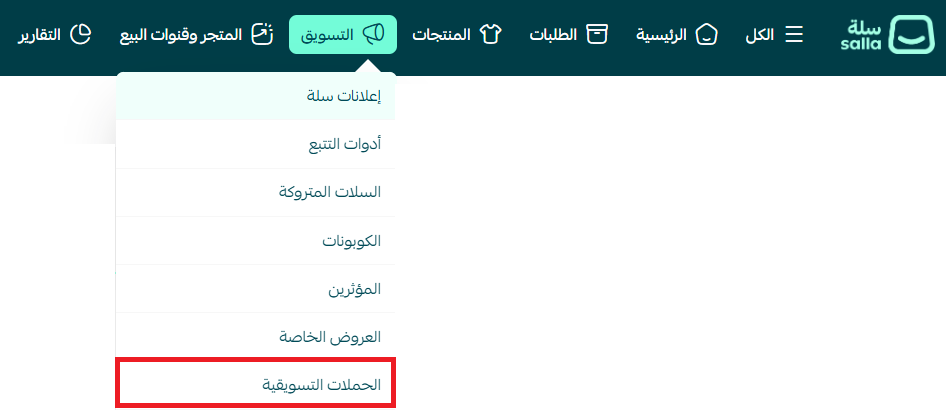
3. Every campaign in the store appears here with its name, status and date, alongside your remaining message balance and a statistics button next to campaigns that have already been sent.
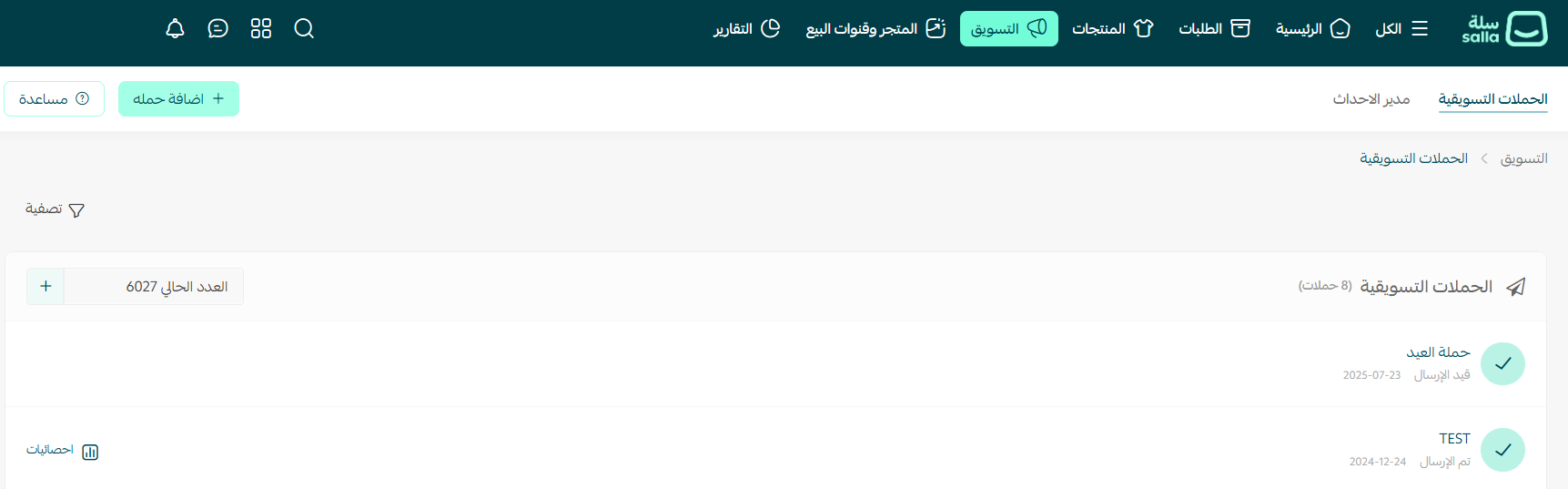
The figure at the top of the list is your current message credit. Schedule a campaign for an audience larger than your balance and the send can stop halfway, distorting every number you read afterwards. Use the add button beside it to top up before any large campaign.
Activating an SMS provider first
You cannot create an SMS campaign until one provider is activated on the service integrations page. It is a one-time setup, but it stops plenty of merchants who start from the campaign form instead.
- Pick the provider that fits your market: some perform better inside Saudi Arabia, others handle Gulf and international numbers more reliably.
- Register a sender name: an approved sender ID makes the message arrive under your store's name rather than an unknown number, which lifts trust and click rate.
- Test before you launch: send a trial to a tiny segment to confirm delivery and how the link renders.
In-app notification campaigns need no external provider — only a store app and users who enabled notifications. Many stores ignore this zero-cost channel, which suits routine reminders that do not justify paying for a text.
Creating a campaign step by step
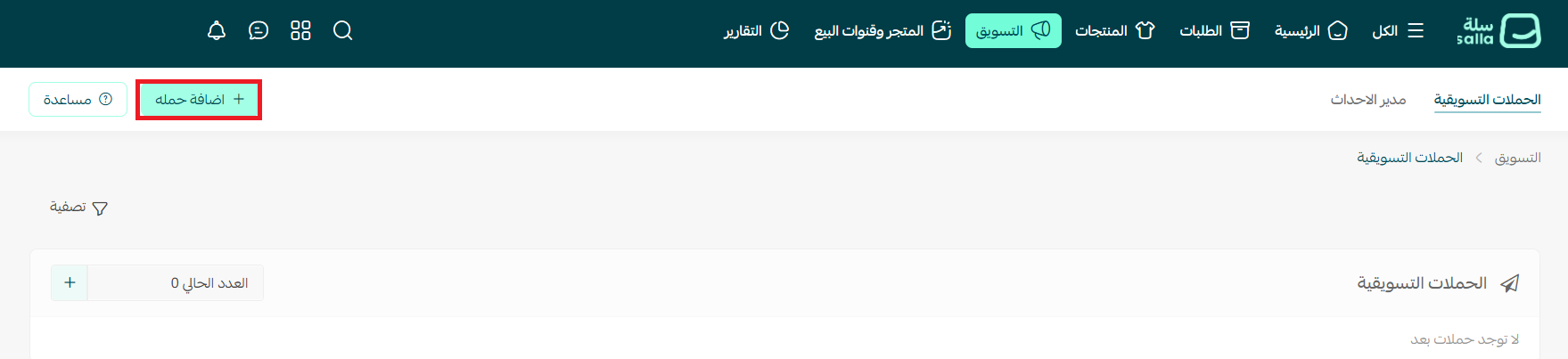
1. On the Marketing campaigns tab, click + Add campaign at the top of the page.
2. Enter a campaign title, then choose the delivery method: via SMS or via app notifications. Write the message body, attach the offers link with the shortening option enabled, then check the message preview to see exactly what the customer will receive.
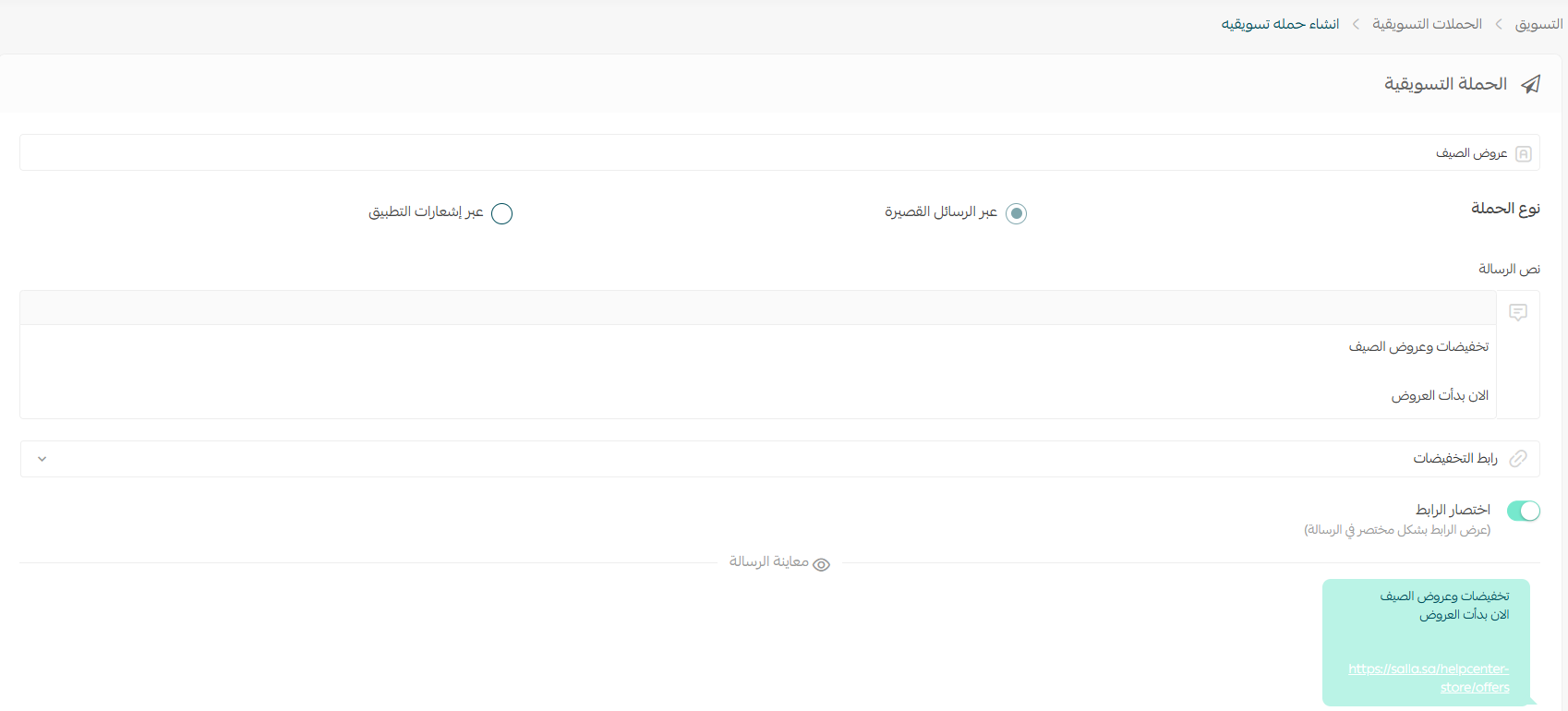
A long URL can eat half the message and push the text into a second segment you get charged for. Shortening saves characters and gives you a measurable link, so you learn how many people clicked rather than how many merely received.
3. In the Target audience section, add the conditions that decide who receives the campaign, with the option to require all of them at once. The number of matching customers updates live, and it is worth pausing on. Under Campaign goal, pick the primary objective, such as purchasing from the store.
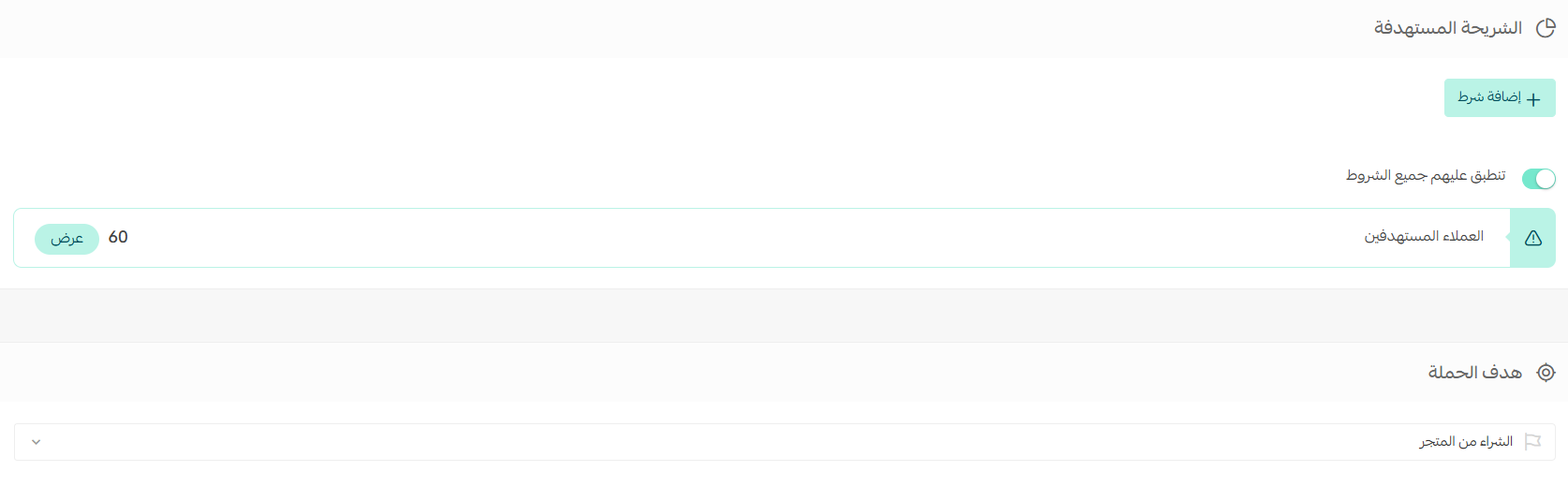
Sending one message to the entire base looks appealing, but it treats someone who bought yesterday like someone who has not opened your store in a year. Three segmented campaigns beat one generic blast, for roughly the same credit.
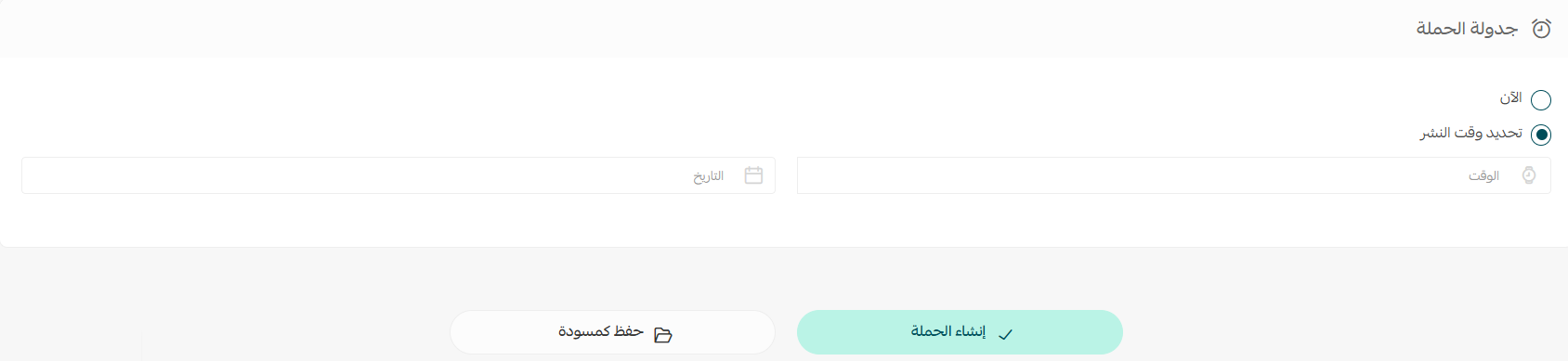
4. In the Campaign scheduling section, run the campaign now or set a publish date and time for later. From there, either save it as a draft to return to, or click Create campaign to publish it with the settings you configured.
Searching and filtering campaigns
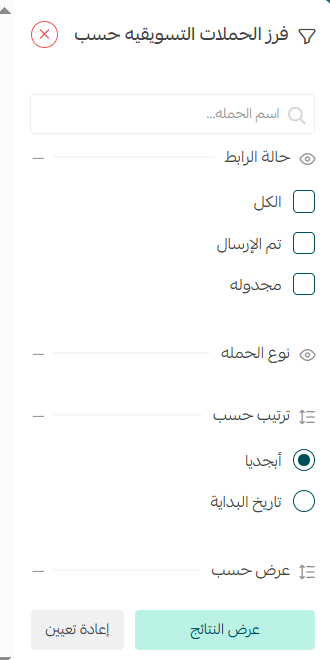
Campaigns pile up season after season, and finding a specific one becomes a chore. On the marketing campaigns tab, click Filter.

The sorting panel opens, letting you search by campaign name or filter by link status and campaign type, with options to order results alphabetically or by start date.
"Campaign 3" means nothing six months later. Use a fixed pattern such as "Ramadan 2026 — app users — 15% off" and you can find any campaign in seconds and compare seasons effortlessly.
Reading campaign statistics
Clicking a campaign name opens its statistics and summary page, where you track performance through reach, engagement and conversion data. This page is the difference between a store that sends messages and one that runs a marketing channel.
- Reach: how many people were actually targeted once your conditions applied. Compare it with the matching-customer count you saw before sending.
- Engagement: who clicked the link inside the message. This judges your copy and your offer, not your product.
- Conversions: who completed the campaign goal. Weak conversions alongside strong engagement point at the landing page, price, or shipping.
Never judge a campaign on an absolute number. One that reached 500 customers and produced 25 orders beats one that reached 5,000 and produced 40, because it spent a tenth of the credit and kept your list from fatigue.
Writing 160 characters that sell
The format is unforgiving: no images, no subheadings, no second chance. The strongest messages use four elements, in this order.
- Sender identity in the first two words: the reader decides in a fraction of a second whether the message deserves attention, and a familiar store name changes that decision.
- The offer in numbers, not adjectives: "30% off skincare" always outperforms "special offers on selected products".
- A reason to act now: a limited window or quantity, provided it is honest. Manufactured urgency stops working fast when it repeats.
- Exactly one link: pointing at the offer page rather than your homepage, and shortened so the text stays inside a single segment.
Avoid decorative symbols too. Some characters switch the message to an encoding that cuts the limit from 160 characters to around 70, so your text quietly bills as two. Check the preview before saving, every time.
An SMS reaches thousands in minutes. If stock is thin, or the coupon carries conditions your copy skipped, you get a wave of frustrated replies instead of orders. Review coupon terms and usage limits before launch, not after.
Timing and frequency: when and how often
Timing decides half the result. A message arriving while someone is busy gets read and dismissed; the same message in downtime gets read and clicked.
- Avoid working peaks: early morning and midday are the weakest windows for most stores.
- Test evenings and weekends: in the Gulf market, the hours after sunset typically show the highest engagement.
- Match the schedule to the offer: a sale ending tonight goes out today; a seasonal promotion goes out days before the season, not at its peak.
- Respect a monthly ceiling: two to three general campaigns a month is sensible, and only tightly segmented sends justify more.
- Split the channels: let app notifications carry routine reminders and keep SMS for offers that genuinely warrant it.
Make advance scheduling a habit: reviewing a draft the next day with fresh eyes catches the typos and broken links thousands of customers would otherwise read.
Turning campaigns into recurring revenue
A single campaign is an event; a campaign system is a revenue channel. The gap comes down to a few decisions we apply in our clients' stores:
- Build a calendar, not improvised sends: map your seasons in advance and give each an audience, a message and a goal, instead of firing off a rescue campaign when sales stall.
- Test one variable at a time: the offer alone, the timing alone, or the opening line alone. Changing three at once gives a result you cannot explain.
- Segment by value: top buyers deserve early, exclusive access; dormant customers need a stronger incentive; new ones need an introduction, not a discount.
- Measure return, not engagement: divide campaign revenue by message cost. Anything that fails to cover its cost twice over needs a better offer or segment.
- Clean your list: numbers that ignored five straight campaigns drain credit and distort your ratios. Exclude them, or give them a genuinely different win-back message.
The mistake we see most often is treating campaigns as a substitute for growth. SMS extracts maximum value from your existing base, but never adds a name to it, and a store messaging the same thousand numbers every month watches results decline no matter how well it writes. A store that genuinely grows works both sides: a base widening through steady search traffic, and retention tools that multiply the value of everyone in it. At SEOS7 we analyze, optimize, maximize — we bring qualified traffic to your product pages, then work on the purchase path until a visit becomes a repeat order. Browse the case studies, or explore our Salla store SEO service.
FAQ
What do I need before creating an SMS campaign?
Activate one SMS provider from the service integrations page in your Salla dashboard, and hold enough message credit for the audience you plan to reach. In-app notification campaigns need no external provider.
Can I schedule a campaign instead of sending it immediately?
Yes. In the campaign scheduling section choose "set publish time" and pick the date and hour, or save the campaign as a draft and review it before publishing.
How do I decide which customers receive the campaign?
In the target audience section you add conditions that define the recipients, with an option to require all of them together. The count of matching customers appears before you send, so you can sanity-check the segment size.
How do I see the results of a campaign after it goes out?
Click the campaign name in the marketing campaigns list to open its statistics and summary page, showing reach, engagement, conversions and other indicators of how it performed.
Why should I enable link shortening in the message?
A long URL consumes a large share of the character limit and can push the message into being billed as two. Shortening frees space and makes the message cleaner when it lands on the phone.
Your customer list is a valuable asset, but what widens it in the first place is your store appearing in front of people searching for your products today. Request a free SEO audit for your Salla store — results within 48 hours, no strings attached.