
Most stores pay to acquire a customer once, then quietly let them walk away after the first order. Cashback flips that equation. Instead of cutting your price and losing margin on the spot, you hand the customer store credit they can only redeem by coming back and buying again. Your promotional budget stops being a consumed discount and starts being a direct investment in the next order.
This guide walks through activating the customer wallet in your Salla store, building a cashback offer with conditions that protect your margin, managing and measuring those offers, and how shoppers actually spend their balance at checkout. Then it adds the layer technical documentation never covers: how to price the incentive, when cashback beats a straight discount, and the mistakes that quietly drain margin with nothing to show for it.
Credit brings customers back, but nobody comes back who never arrived. Read the discount coupon guide to understand instant discounts versus deferred credit, and the abandoned carts guide to recover the orders that stalled one step before payment.
- What the customer wallet and cashback are
- Activating the wallet and its settings
- Creating a new cashback offer
- Offer conditions: limits, included and excluded
- Publishing settings and the store banner
- Managing and tracking your offers
- The customer's wallet experience
- Returns, cancellations and clawing back credit
- A cashback strategy that actually pays
- Frequently asked questions
What the customer wallet and cashback are
The customer wallet creates a digital wallet for every registered customer in your store, holding two kinds of balance: cashback earned from your offers, and refunded amounts when an order is returned or cancelled. The distinction between cashback and a cash refund is simple but decisive — a cash refund leaves your system for the customer's bank account, while cashback stays inside your store waiting for the next order. That makes cashback a loyalty tool, not a discounting tool.
- It lifts repeat purchase rate: the customer holds a balance that is worthless anywhere else.
- It turns returns into opportunities: instead of a slow bank transfer, the amount lands in their wallet instantly.
- It protects your list price: the market never sees you discount, so brand value holds.
- It shortens the return cycle: an expiry window pushes the next purchase into a timeframe you choose.
The wallet feature requires a store connected to a custom domain; stores still running on the default Salla URL cannot activate it. Note too that the wallet does not appear on manual payment link pages.
Activating the wallet and its settings
1. From the dashboard sidebar, open Marketing Tools, then select Cashback Offers.

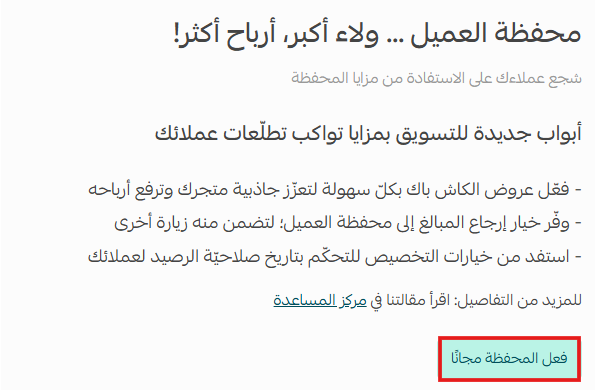
2. Click Activate the wallet for free to switch the feature on for your store.
3. Click Wallet settings to open the configuration page.

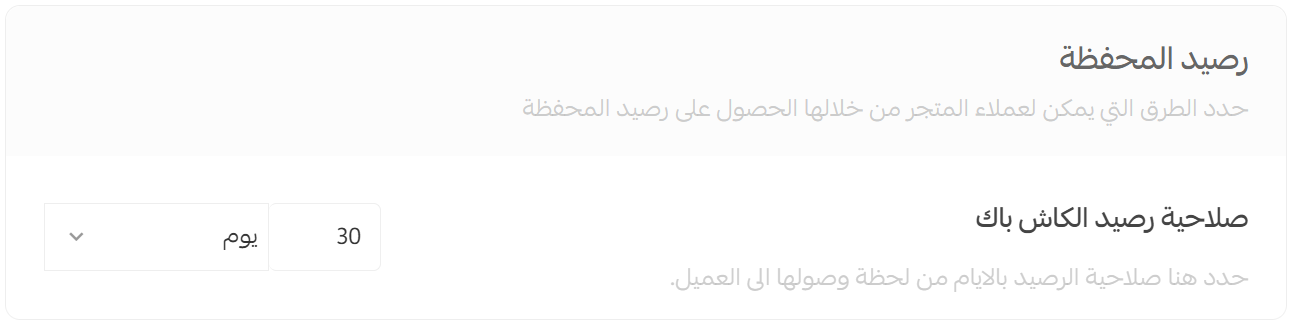
4. Set the cashback balance validity period. This is the single most consequential field on the page, because it governs how fast customers return. Too short and it reads as pressure; too long and the incentive loses all urgency. For most stores the practical range sits between 30 and 90 days, tuned to your own repurchase cycle.
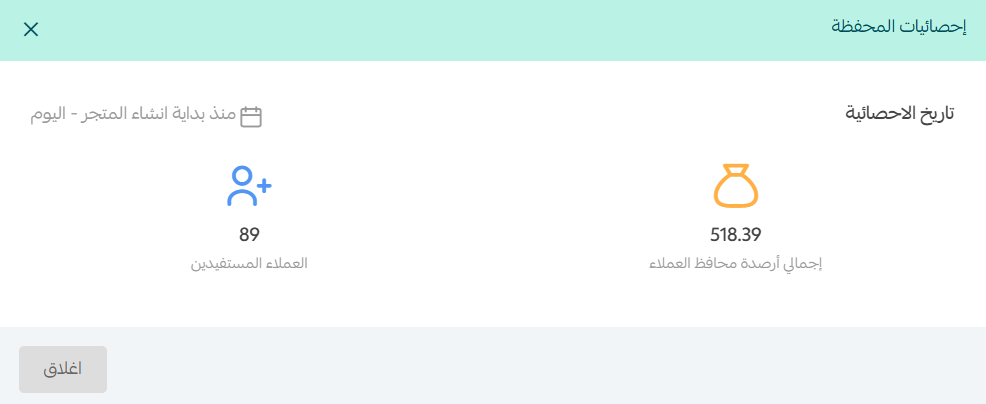
5. Enable General statistics to track how your offers perform: total balances sitting in customer wallets, how many customers benefited, and the redemption rate.
Creating a new cashback offer
Once the wallet is live, open the Cashback Offers page and click Create cashback offer.
In the Offer details tab, fill in the essentials:
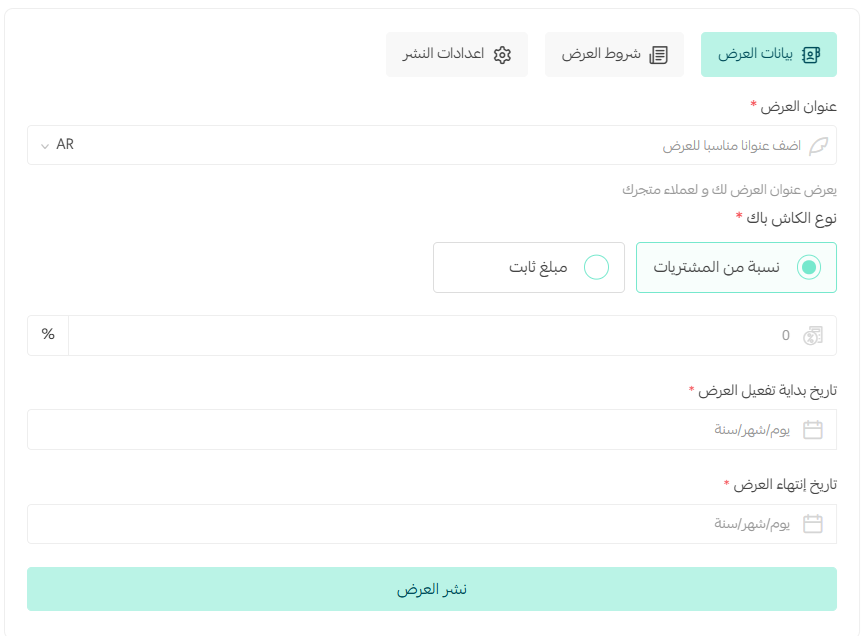
- Offer name: customers see it, so make it state the value rather than describe it. "10% cashback on orders over SAR 100" beats "Summer promo" every time.
- Percentage cashback: the customer earns a share of the order value. Best when your goal is a higher average order value, since the reward scales with basket size.
- Fixed-amount cashback: a set amount per qualifying order. Best when you want a hard ceiling on cost, and when your product prices cluster in a narrow range.
- Start date: align it with your campaign or the season you are targeting.
- End date: always set one explicitly. An open-ended offer cannot be measured against a clean window, and measurement is the whole point.
The offer end date is not the balance expiry date. The first stops new cashback from being earned; the second wipes credit already sitting in a customer's wallet. State both plainly in your offer copy and you will spare your support team a wave of complaints.
Offer conditions: limits, included and excluded
This is where a generic reward becomes a precise marketing instrument. In the Offer conditions tab, define the rules a customer must satisfy to earn the credit.
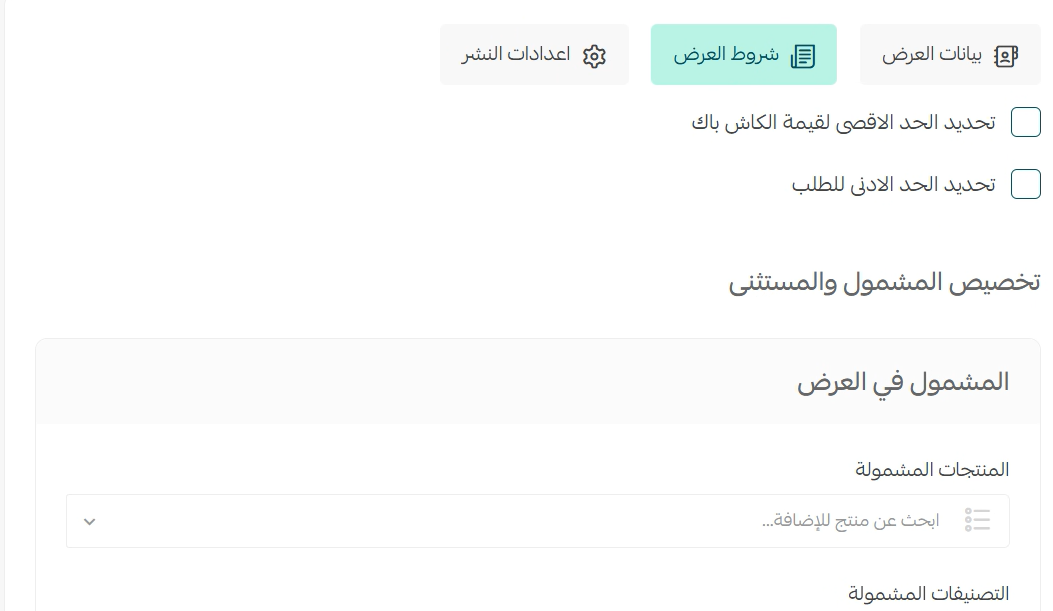
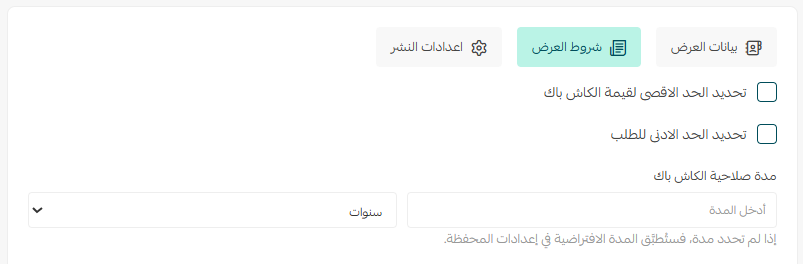
Minimum basket value stops you from rewarding orders too small to cover packaging and shipping. Set it at SAR 100 and any smaller basket earns nothing — which nudges the shopper to add one more item to qualify.
Maximum cashback value is your budget safety valve. With a 10% offer capped at SAR 50, a customer spending SAR 600 would theoretically earn SAR 60 but receives 50, while someone spending SAR 300 earns their full SAR 30.
Included items let you point the incentive at specific products, categories, payment methods or customer groups — launching a new product, reviving a stagnant category, or rewarding your VIP segment alone.
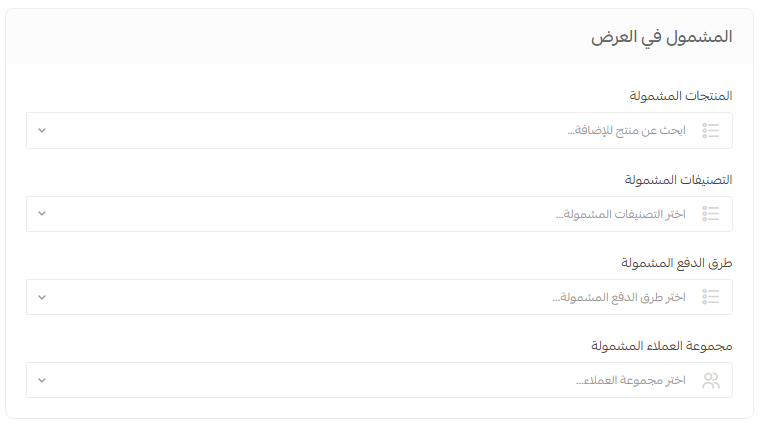
Excluded items work the opposite way: run a store-wide offer while shielding specific exceptions — a limited-stock product, the gift card category, cash on delivery, or your wholesale customer group.
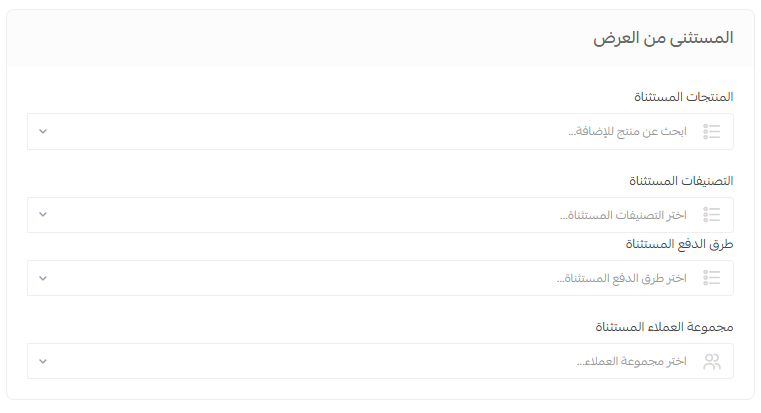
If your goal is store-wide momentum, build the exclusion list rather than the inclusion list. Long inclusion lists go stale the moment you add new products; exclusion lists stay short and stable.
Publishing settings and the store banner
The Publishing settings tab decides where the offer appears and how it is worded:
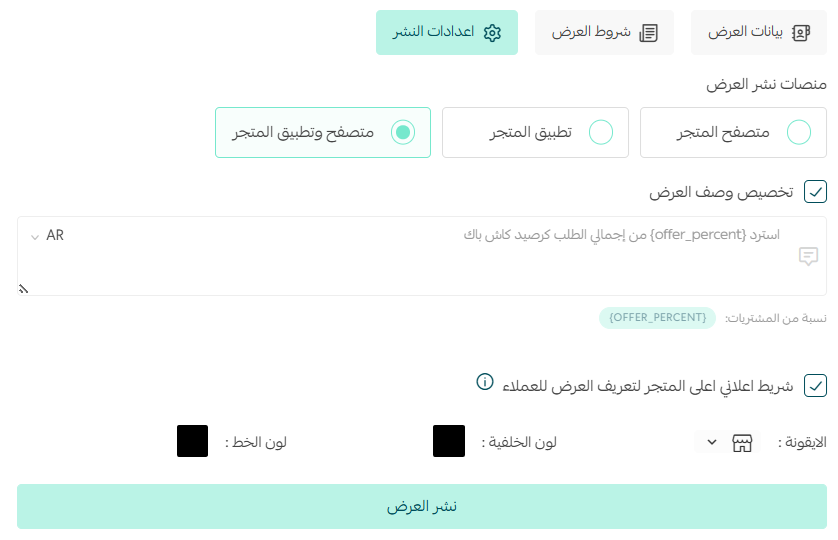
- Publishing channels: store browser only, store app only, or both. Choose both unless you have a specific reason to confine the offer to one channel.
- Offer description: the copy the customer reads. You can drop the percentage variable into the text so it renders automatically, as in "Get 10% of your order back as cashback credit".
- Store banner: a strip across the top of your storefront announcing the offer, with control over its icon, background colour and text colour to match your brand.

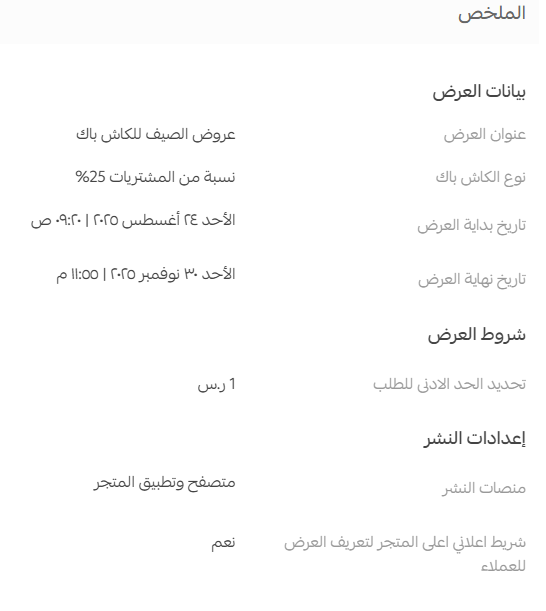
Review the offer summary carefully, then hit Publish offer.
Use strong contrast between text and background and keep the message short. A long, low-contrast banner is visually filtered out within a second — you pay the cost of the offer while nobody registers it exists.
Managing and tracking your offers
The Cashback Offers page lists every offer you have created. Click an offer name to open its full details, or use the More menu beside it to edit or delete.
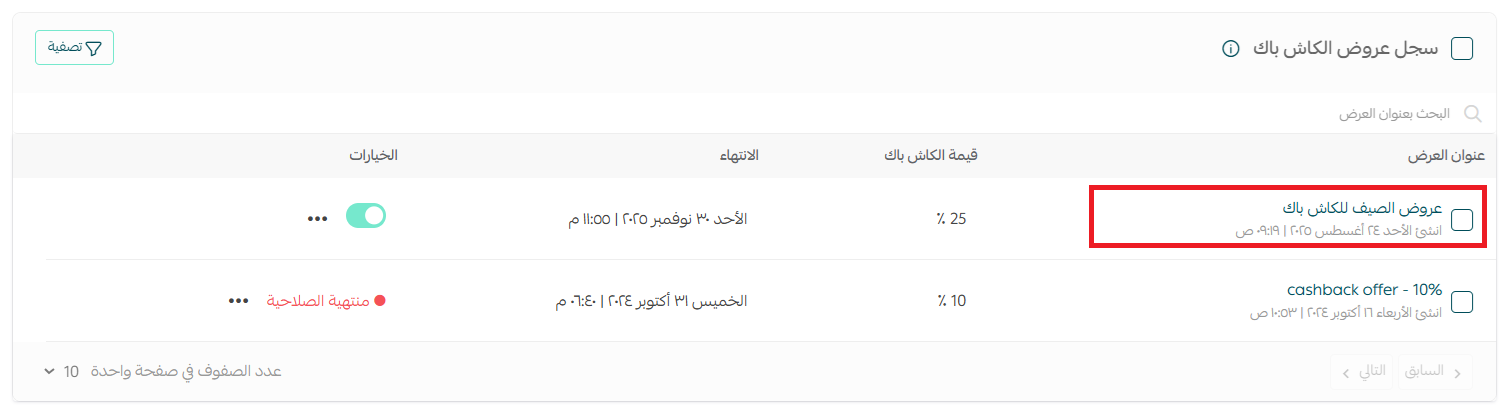
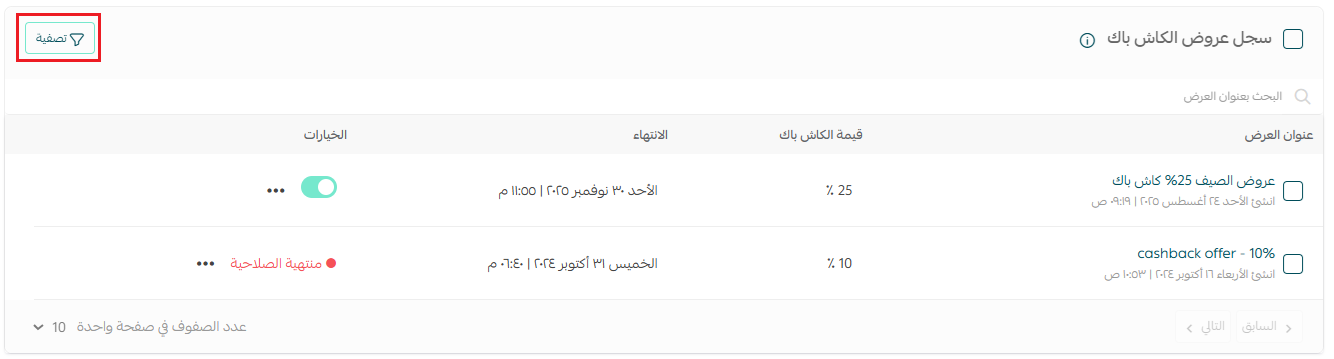
As offers accumulate across seasons, use Filter to show only what is active, scheduled or expired.
To inspect an individual shopper, open Customer management, find their card and click Customer wallet. You will see every transaction — additions in green, deductions in red — with expiry dates, transaction type, and the staff member who performed it. From the same screen you can adjust the balance up or down, attach a message sent by email, SMS or app notification, and record an internal note explaining the reason.
You can run several cashback offers simultaneously on the same product or category without conflict; the system automatically applies only the most generous one. Budget with that in mind before stacking campaigns.
The customer's wallet experience
When a shopper meets the offer conditions, a notification of the cashback they have earned appears on the checkout page — right at the moment the purchase decision is being made.
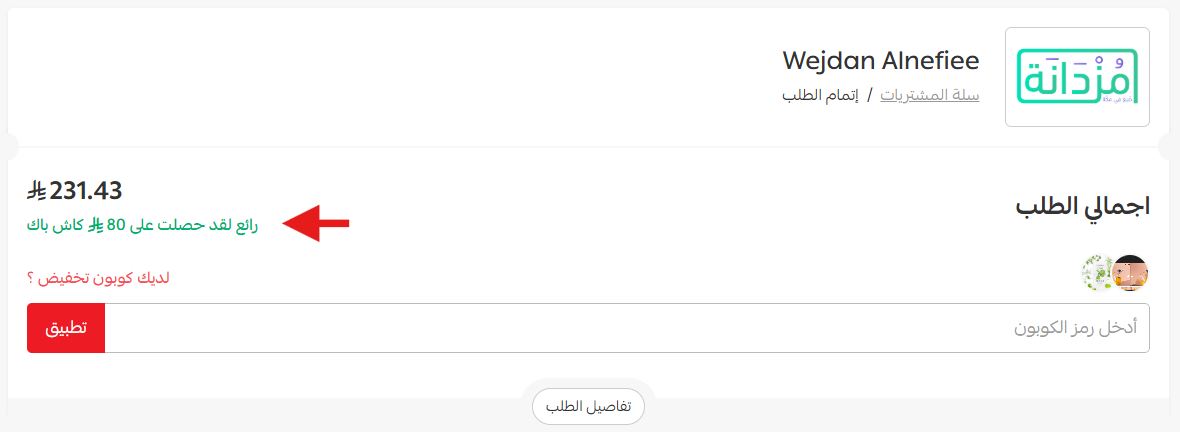
The credit is not actually deposited until the order status moves to one of the approved states: completed, shipped or delivered. If you defined custom statuses in the offer settings, those apply instead; otherwise the platform defaults are used.
On their next order, the customer spends the balance by choosing Pay with wallet at checkout.
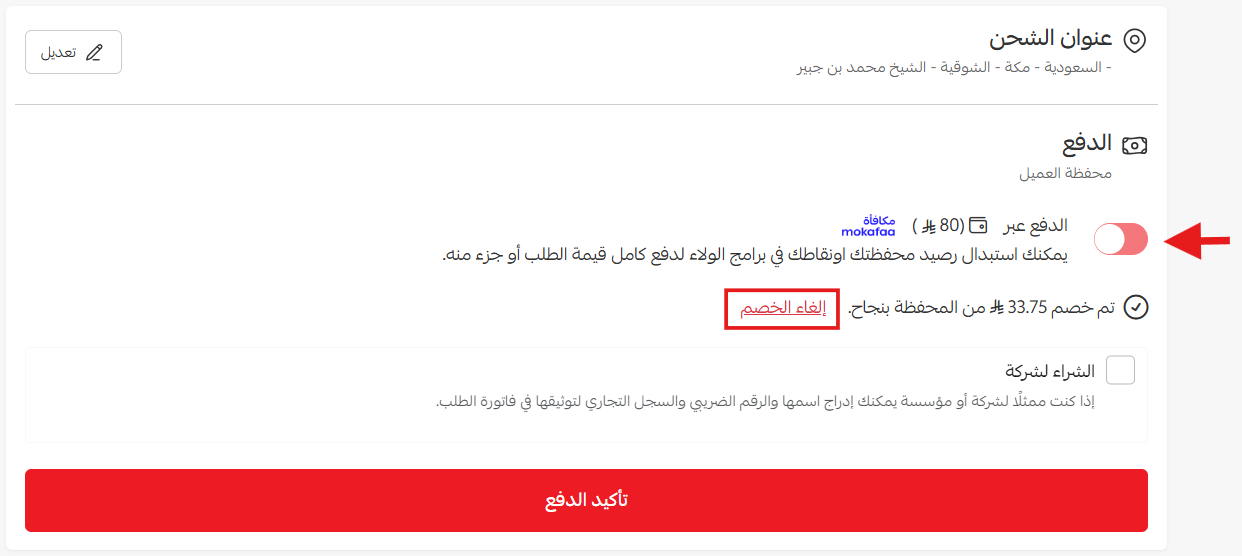
If the balance covers the order in full, they complete the purchase with the wallet alone and no second payment method. If it covers only part, the available credit is deducted and the remainder is settled with any other method: bank card, cash on delivery, Apple Pay, or the instalment services enabled in your store.
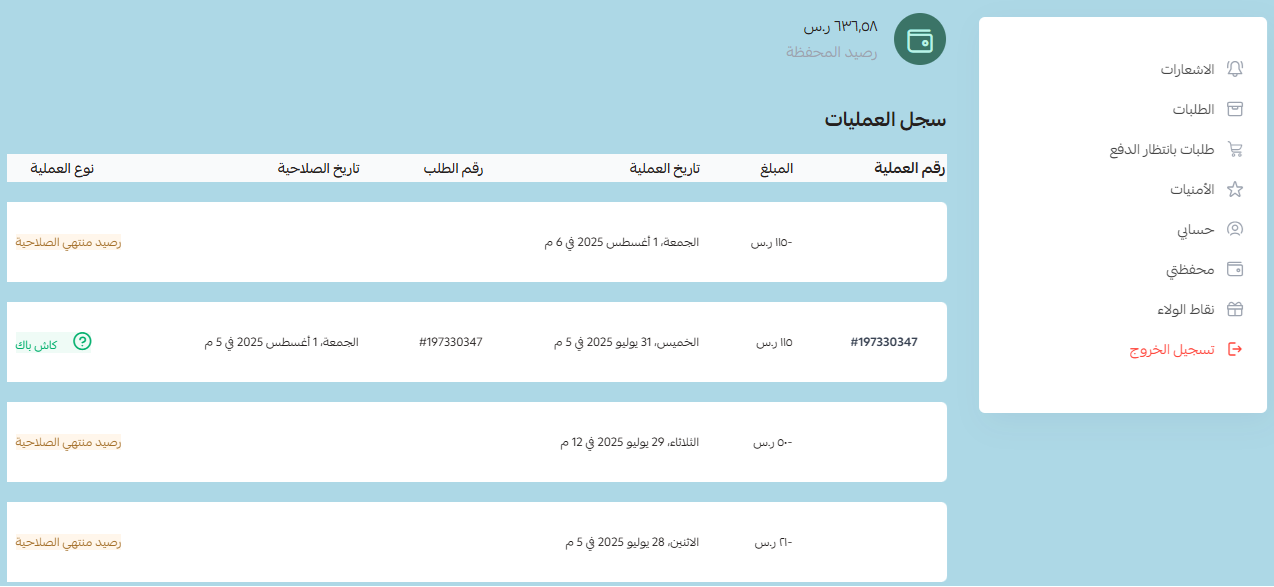
Customers review every movement from the My wallet page in their account: credit earned from offers, credit spent on purchases, credit refunded after a return, and credit that has expired.
Returns, cancellations and clawing back credit
When you move an order status to cancelled or returned, an option appears to reclaim the cashback the customer earned, pulling the credit tied to that order back out of their wallet so balances stay accurate.
To do it manually from the returned order page, click Refund the customer, set the cashback amount, then click Withdraw points from customer and confirm.
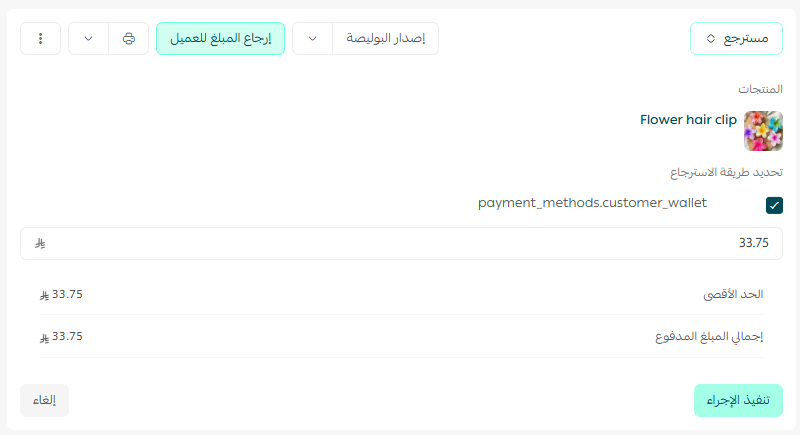
Once an order value has been refunded into the customer's wallet, it cannot be sent back to their card. Reversing it means manually deducting from the wallet and then issuing a bank transfer. Agree a clear policy with your team before your first return.
A cashback strategy that actually pays
The feature takes ten minutes to switch on. The expensive mistakes all come afterwards. These are the rules we apply with our clients' stores:
- Cost the offer against the second order, not the first. A 15% cashback offer is not a 15% loss if half the people who earn it come back. Divide total credit issued by the repeat orders it generated, then compare that to what a new customer costs you in paid ads.
- Tie the rate to category margin. Point high rates at high-margin or slow-moving categories, and exclude thin-margin products entirely.
- Replace seasonal price cuts with richer cashback. Instead of a 20% cut that vaporises margin immediately, offer 25% cashback: a stronger campaign headline, and sales that continue after the season ends rather than stopping with it.
- Set expiry slightly inside the natural repurchase cycle. If customers return every 75 days, set validity at 60 — pulling the next order forward two weeks without feeling punitive.
- Route every refund into the wallet. Money returned to a card leaves your business permanently; money returned to the wallet stays a sales opportunity.
- Tell the customer the credit exists. Send a reminder a week before expiry and mention the balance in post-purchase messaging.
The most expensive mistakes: leaving the offer end date open so results can never be attributed; a high percentage with no cap that burns the budget on a handful of large orders; skipping the minimum basket value and rewarding orders that do not cover their own shipping; and running the offer with no page explaining it, forfeiting search demand for phrases like "stores with cashback" in your niche.
That last point is where we come in. A cashback offer raises the value of every visitor you already have — but the number of visitors is a separate battle entirely. At SEOS7 we analyze, optimize, maximize: we bring qualified search engine traffic through store SEO, then work on converting more of it into orders. Explore Salla store SEO, or review our case studies to see the before-and-after numbers.
Frequently asked questions
When is cashback credit added to the customer's wallet?
It is added automatically once the order reaches one of the statuses approved in the offer settings — typically completed, shipped or delivered. If you did not define custom statuses, the platform's defaults apply. If the order never reaches an approved status before the offer ends, no credit is issued at all.
Do customer wallet balances draw down my own store wallet?
No. Amounts sitting in your customers' wallets are not deducted from your store wallet balance. They remain with the customers to offset future orders, and you can review the total across all customers from the wallet statistics page in your dashboard.
Can cashback be combined with a discount coupon or other payment methods?
Yes on both counts. A discount coupon can be used alongside wallet credit on the same order, and cashback is calculated on the final amount paid after the discount, provided the offer conditions are still met. A customer can also pay part of an order from the wallet and settle the rest by card, cash on delivery, or any other enabled method.
What happens when credit expires, or if I disable the feature?
Expired credit is dropped automatically and cannot be spent, which is exactly what makes the validity period a motivator. If you disable the feature, customers can still spend balances already in their wallets but can no longer earn new credit, and all of your financial records remain intact.
Can a customer cash out the balance, or earn it as a guest?
No to both. Wallet credit can only be spent inside your store on new purchases and is never paid out in cash. And a visitor checking out as a guest without an account has no wallet, so no credit can be issued to them.
Cashback is live and you now want far more customers reaching it? The SEOS7 team combines search engine traffic for your Salla store with conversion work all the way to the final step. Request a free SEO audit for your store and you will have the results within 48 hours, with no obligation.